
 Need help?
Do you have a question about the Eclipse POWERSHADE MH005 and is the answer not in the manual?
Ensure motor with SET button and charge port face downwards during bracket fitting.
Hold the SET button on the motor for approximately 8 seconds until it beeps.
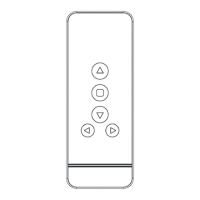
Select the desired channel using directional buttons if using a multi-channel remote.
Hold SET on motor until it beeps slowly, then press 'C' on remote; motor beeps fast.
Press a remote button to check if the blind moves in the correct direction.
Hold 'L' and a directional button on the remote to reverse the motor's turning direction.
Press and hold 'L' on the remote until the motor beeps fast to enter level setting mode.
Lower blind, stop, fine-tune, and press 'C' on remote to save the lower level.
Raise blind, stop, fine-tune, and press 'C' on remote to save the upper level.
Move blind to desired position, hold 'L' and directional button to save mid level.
Program each blind individually (steps 1-22) before grouping.
Hold SET on motor to break links, then re-link to desired remote channel.
Use directional buttons on the remote to operate all grouped blinds simultaneously.
This document outlines the programming instructions for the Powershade motorised blind, model MH005. It covers initial setup, linking the remote control to the motor, adjusting motor direction, setting lower, upper, and mid-level positions, and grouping multiple blinds.
The Powershade MH005 is a motorised blind system designed for automated window covering. It operates with a remote control, allowing users to raise, lower, and stop the blind at desired positions. The system supports both single and multi-channel remote controls, enabling individual or group control of multiple blinds. The motor features a "SET" button for programming and a charge port for power. The programming process involves a series of button presses on both the motor and the remote control, often accompanied by audible beeps from the motor to confirm actions.
 General
| Brand | Eclipse |
|---|---|
| Model | POWERSHADE MH005 |
| Category | Window Blinds |
| Language | English |

 To Next Page
