ECO-DIM.07 Zigbee
Installation
Suitable for Zigbee home automation systems
TouchLink
• Google Assistant/
Home (Zigbee hub
needed)
• Amazon Alexa
(Zigbee hub
needed)
• Philips Hue
• HOMEY
• FutureHome
• Trust
• Aduro Smart
• Aeotec Smart-
Things
• WINK
• IKEA Dirigera
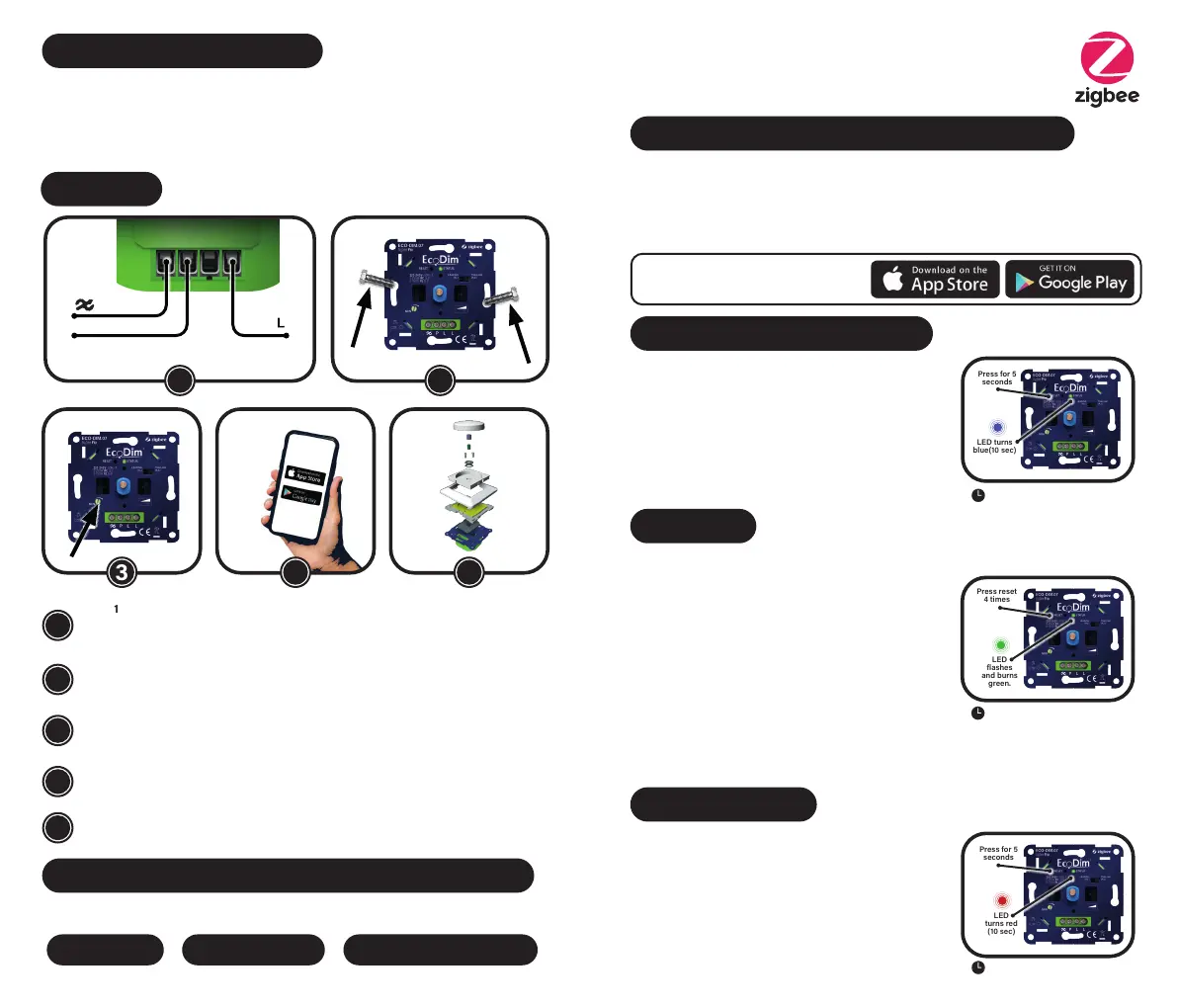
Step 1
Always ensure that the electricity is switched o during installation. Then connect the
power wires as shown in the ‘Wiring diagram’.
Step 2
Now install the dimmer in the flush-mounting box using the screws.
Step 3
Switch the electricity on again. Turn on the connected lamps using the dimmer shaft.
Now set MIN as indicated under ‘Setting min. light level’.
Step 4
Now link the dimmer to your SMART home system.
Step 5
Replace the cover frame, central plate and dimmer button on the dimmer.
1
2
3
4
5
4 5
21
3
PRO
P
LED
flashes
and burns
green.
Press reset
4 times
3 min. timeout
Reset the dimmer
Press and hold the reset button for 5 seconds, the
indicator will remain red for 10 seconds.
Please note that all configuration parameters will be reset
after the device is reset or removed from the network.
LED
turns red
(10 sec)
Press for 5
seconds
15 min. timeout
Put dimmer into pairing mode
Remove the device from the previous Zigbee network if it
has already been added, otherwise pairing will fail.
Press the reset button twice.
The indicator light starts flashing blue and stays on for 10
seconds when pairing is successful. Timeout 15 minutes.
LED turns
blue(10 sec)
Press for 5
seconds
15 min. timeout
Suitable cover plate brands
• Berker by Hager
• Busch-Jaeger
• GIRA
• JUNG
• Kopp
• Merten by Schneider
• Niko*
• PEHA
DOWNLOAD THE APP AT:
When calculating the LED connection power of the dimmer, take into account the PowerFactor
of the dimmable LED lighting. See the global calculation below for this.
Example: 10 lamps * (5W per lamp / 0.8 PowerFactor) = 62.5 Watt
Reduction of connection capacity by PowerFactor
NOMINAL POWER
NUMBER OF LED LIGHT
SOURCES
NOMINAL POWER LED /
POWERFACTOR.
=
*
*NIKO plate is not included. Available separately on the EcoDim website via ED-10072
Reset the dimmer if it is already included in a Zigbee
network.
Press the reset button 4 times, the indicator starts
flashing green and stays on for 10 seconds.
Bring the remote within 10 cm of the smart dimmer and
set the remote to TouchLink.The LED will flash several
times on successful connection
Note: If the dimmer and touchlink device are not connected to
a hub, a maximum of 1 touchlink device can be linked. If you
want to link multiple touchlink devices, you will always need a
Zigbee hub.



 To Next Page