For the SMART dimmer to work optimally or suitable for your preference, you can adjust the brightness at the Min.
and Max. level and also the dimming speed with the MIN./MAX./Dimming Speed adjustment.
MIN adjustment: Switch on the lights, insert a screwdriver in MIN and turn to the left. When the light becomes
unsteady, turn slightly back to the right so that the light remains steady.
MAX adjustment: Switch on the lights, insert a screwdriver in MAX and turn to the right. When the light becomes
unsteady, turn slightly back to the left so that the light remains steady.
Dimming Speed adjustment: Insert a screwdriver in Speed, clockwise to increase the dimming speed when you
push the momentary switch, vice versa.
4. Zigbee Setting
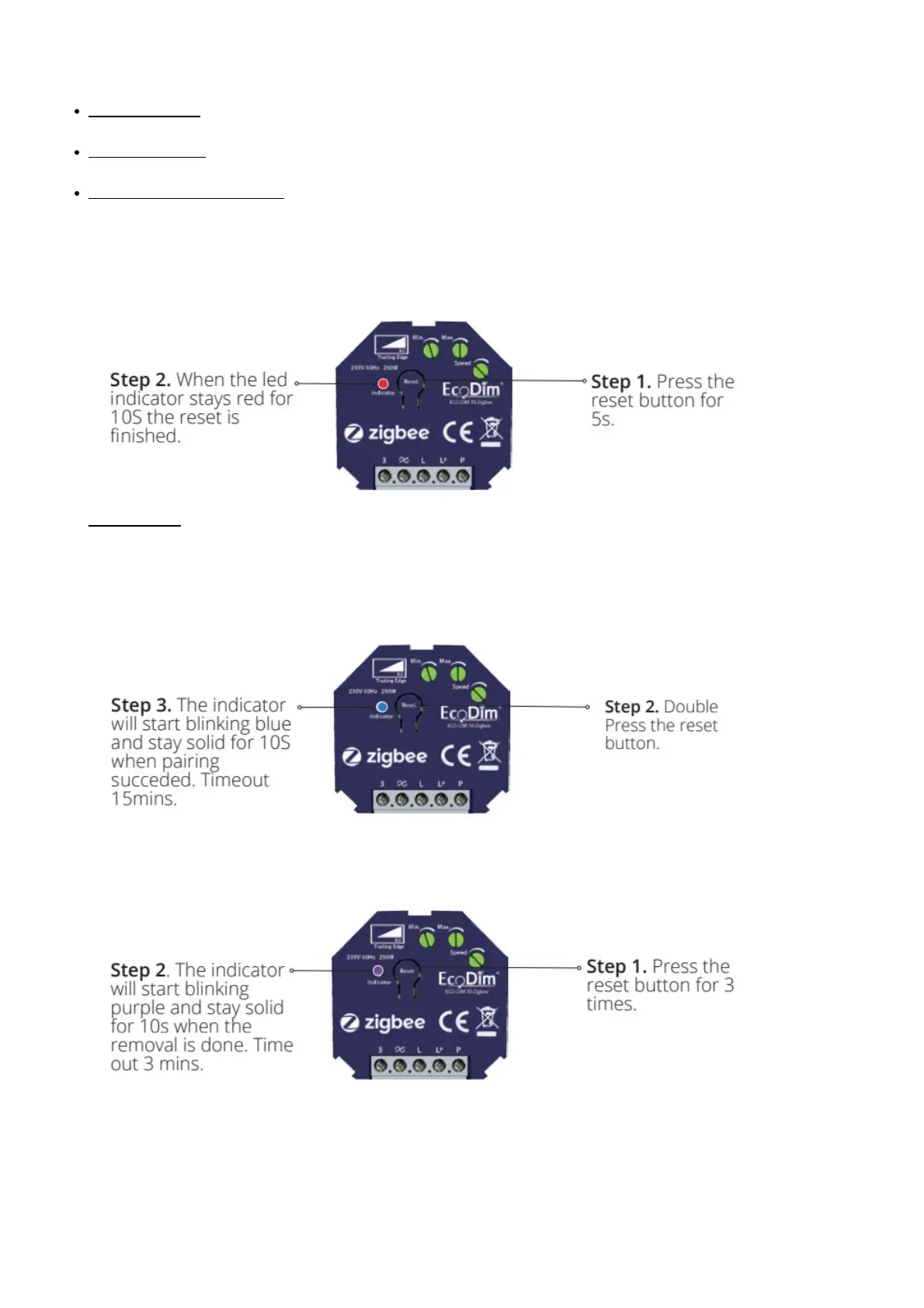
1. Factory Reset
Please Note:
This procedure should only be used when the primary controller is inoperable.
All configuration will be reset after the device is reset or removed from the network.
2. Inclusion to a Zigbee Network
Step 1. Remove the device from the previous Zigbee network in case it has been added to, otherwise pairing
mode will fail.
3. Remove from a Zigbee Network
Method 1. Choose delete or reset as instructed from your Z-Wave hub interface
Method 2. Remove from the Device, see below instructions.
4. TouchLink



 To Next Page