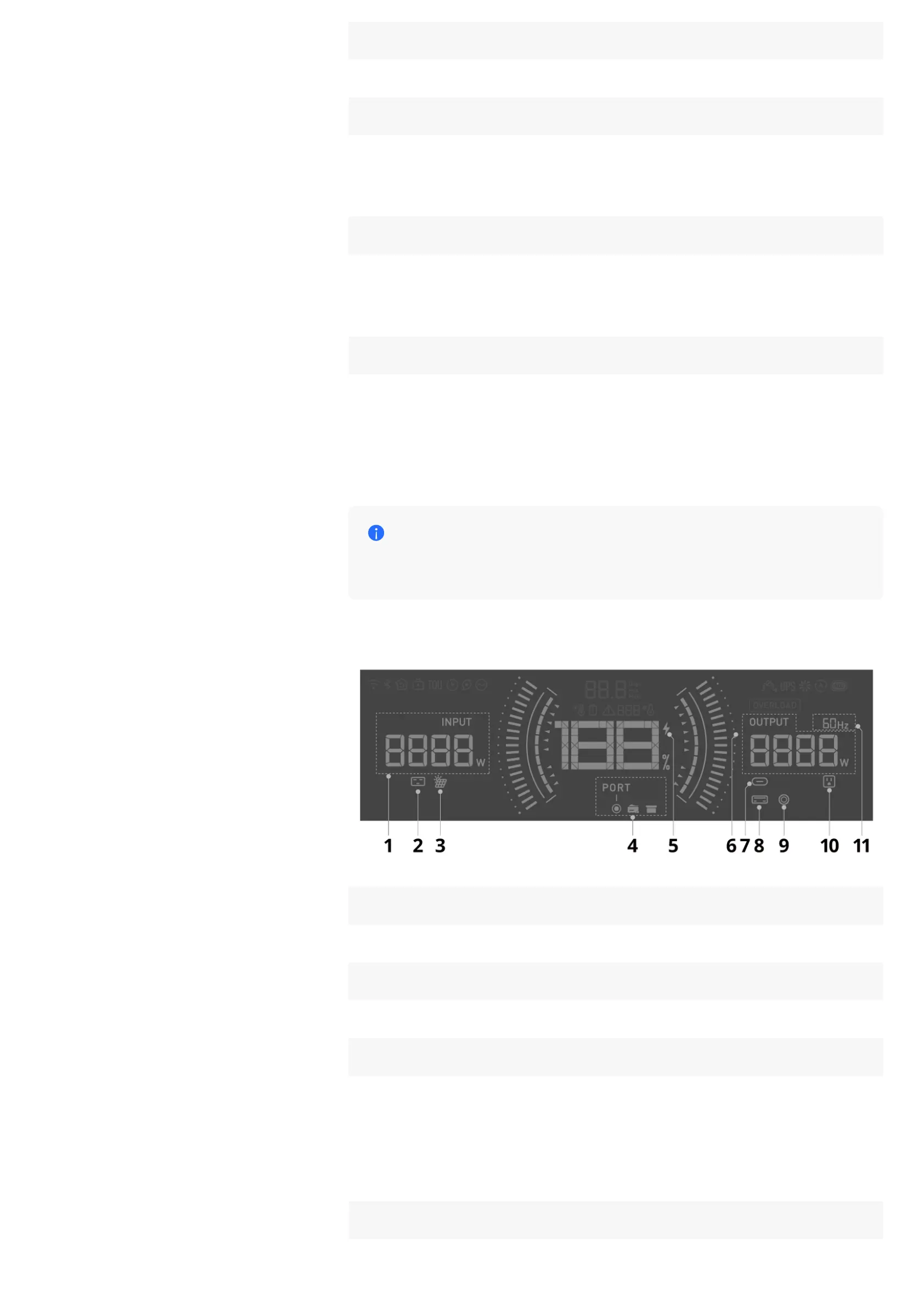
10 UPS Indicator
On: The UPS function is available/active.
11 Fan Status
On: The ventilation fan is running.
Flashing: Abnormal fan status.
12 Generator Auto On/Off
On: The automatic start / stop of the connected generator has been set up in
the EcoFlow app. This feature is only applicable to an EcoFlow Smart
Generator connected to this power station via the Extra Battery port.
13 Adjustable Charging Speed
On: The AC charging speed has been set manually. The power station will be
charged at the customized speed defined in the EcoFlow app.
Power Input / Output Details
A port malfunction is detected when an input / output icon is
flashing. Please check the EcoFlow in-app instructions for
troubleshooting.
1 Total Input Power
On: Displays total input power.
2 AC Input
On: The port is physically connected and has power input.
3 Solar Input / Car Input
On: The port is physically connected and has power input.
Flashing:
1. Indicates that low light protection has been triggered, or
2. Indicates overvoltage or undervoltage.
4 Extra Battery Input / Output










 To Next Page