On: A compatible EcoFlow product (EcoFlow Smart Extra Battery, EcoFlow
Smart Generator, etc) is connected via the Extra Battery port.
5 Charging Status
On: The power station is charging.
6 Total Output Power
On: Displays total output power.
7 USB-C Output
On: The USB-C ports are enabled.
8 USB-A Output
On: The USB-A ports are enabled.
9 12V DC Output
On: The Cigarette Lighter and DC5521 ports are enabled.
10 AC Output
On: The AC output sockets are enabled.
11 Frequency
On: Displays operating AC power frequency (50 Hz / 60 Hz).
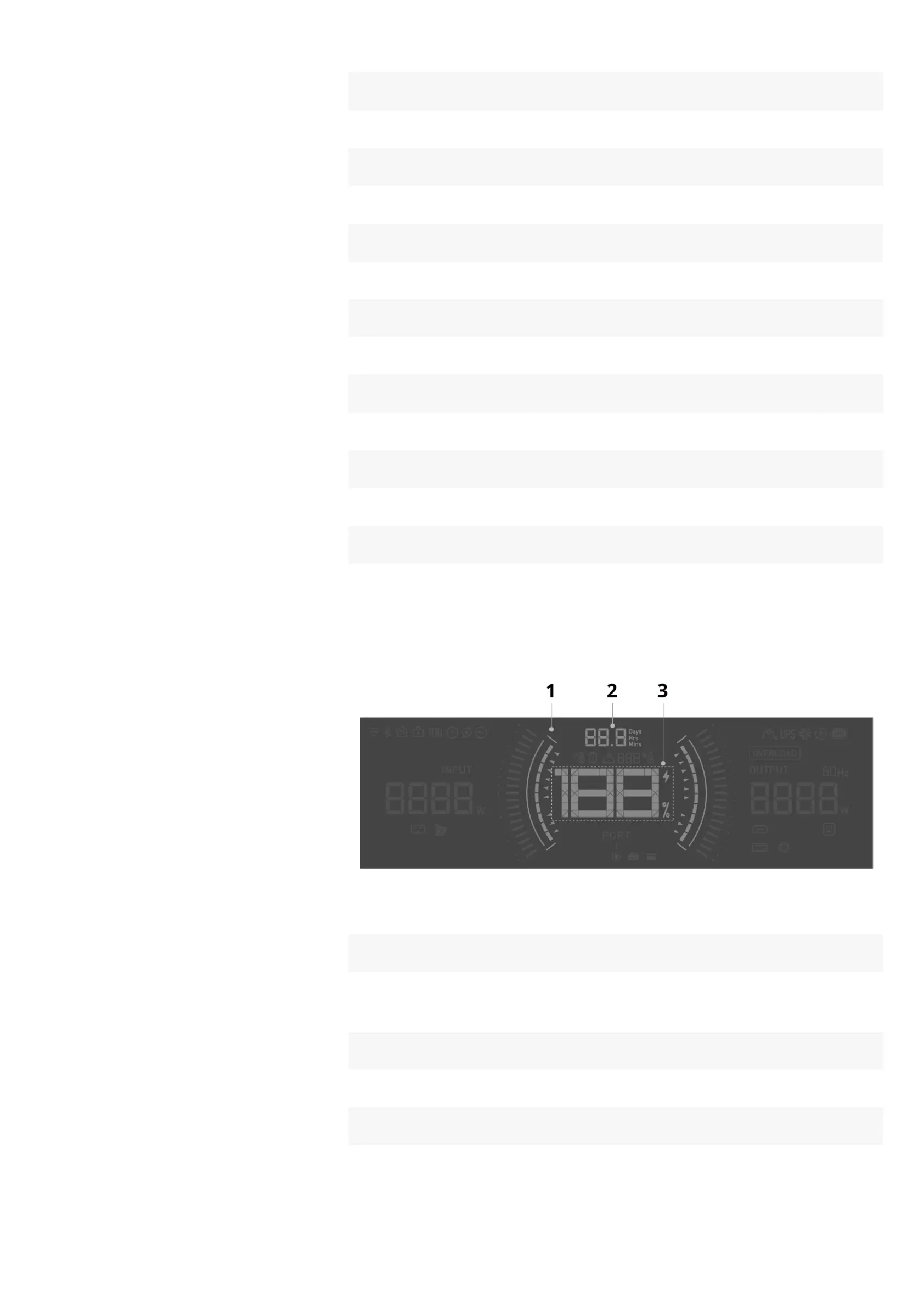
1 Charging / Discharging Limit
On: The charging limit (green) or discharging limit (red) is set in the EcoFlow
app.
2 Remaining Charging / Discharging time
On: Displays the remaining charging or discharging time.
3 Battery Level
On: Displays current battery level.










 To Next Page