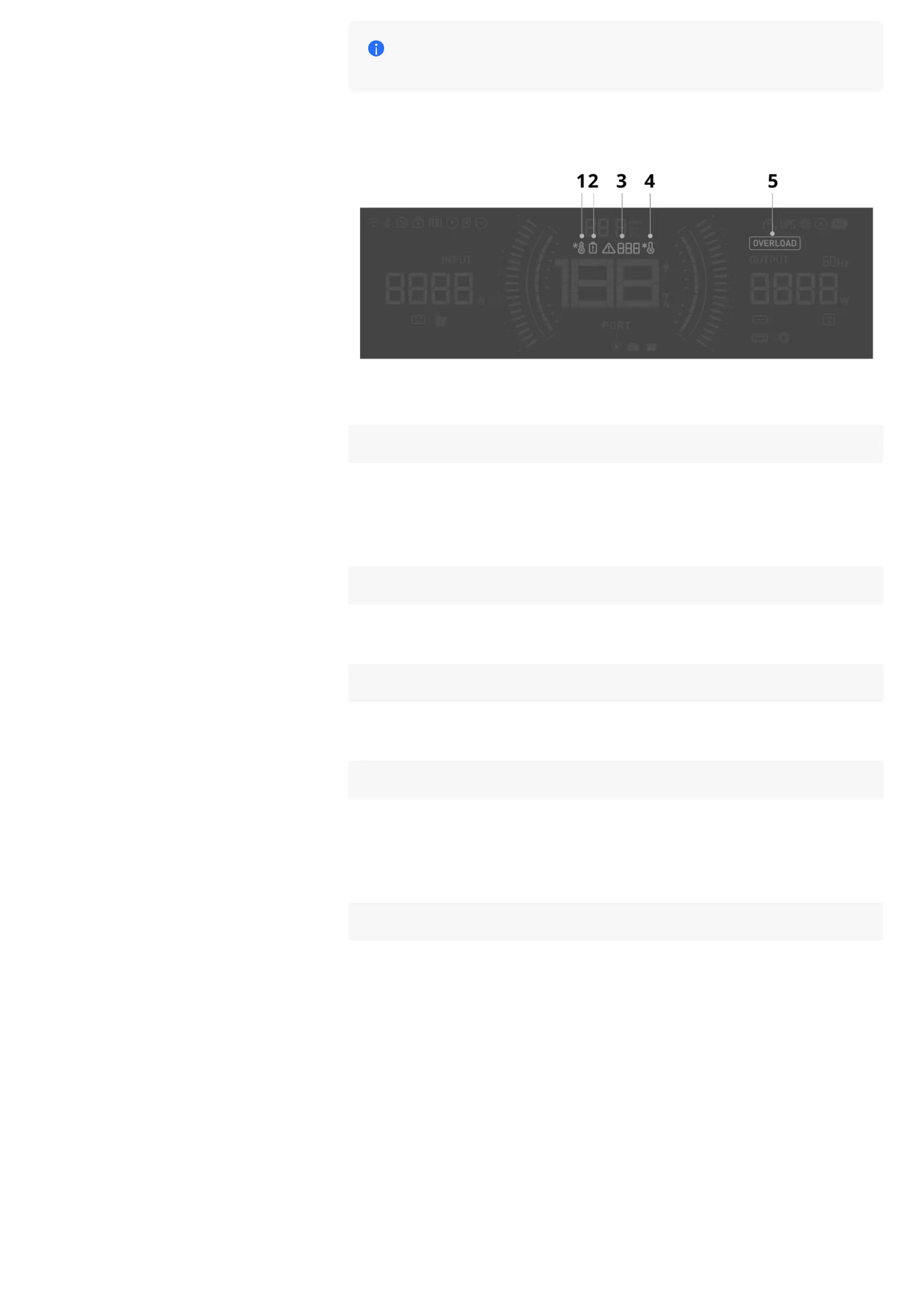
If the error message does not disappear after troubleshooting,
please stop using it immediately (do not try to charge or discharge).
Error Icons
1 High Temperature Warning
Flashing: High temperature protection is triggered. Stop operation and place
the power station in a location away from heat sources with good ventilation.
The alarm will disappear once the power station temperature returns to normal
operating levels.
2 Battery Error
Flashing: An error has occurred. Check the EcoFlow in-app instructions for
troubleshooting.
3 Error Code
On: An error has occurred. Check the EcoFlow in-app instructions for
troubleshooting.
4 Low Temperature Warning
Flashing: Low temperature protection is triggered. Move the power station to a
warmer location to ensure usage within the appropriate temperature range.
The warning will disappear once the power station temperature returns to
normal operating levels.
5 Overload Warning
Flashing: Overload protection is triggered. Disconnect some devices from the
power station to decrease the overall power output. The warning will
disappear once the power output returns to its usual level.
Buzzer
The power station's buzzer continues to alarm (beep three times per second)
when a severe port malfunction is detected.
Please stop using the power station immediately, remove all input or output
connections, and contact EcoFlow Customer Service for troubleshooting.










 To Next Page