6
EN
Usage
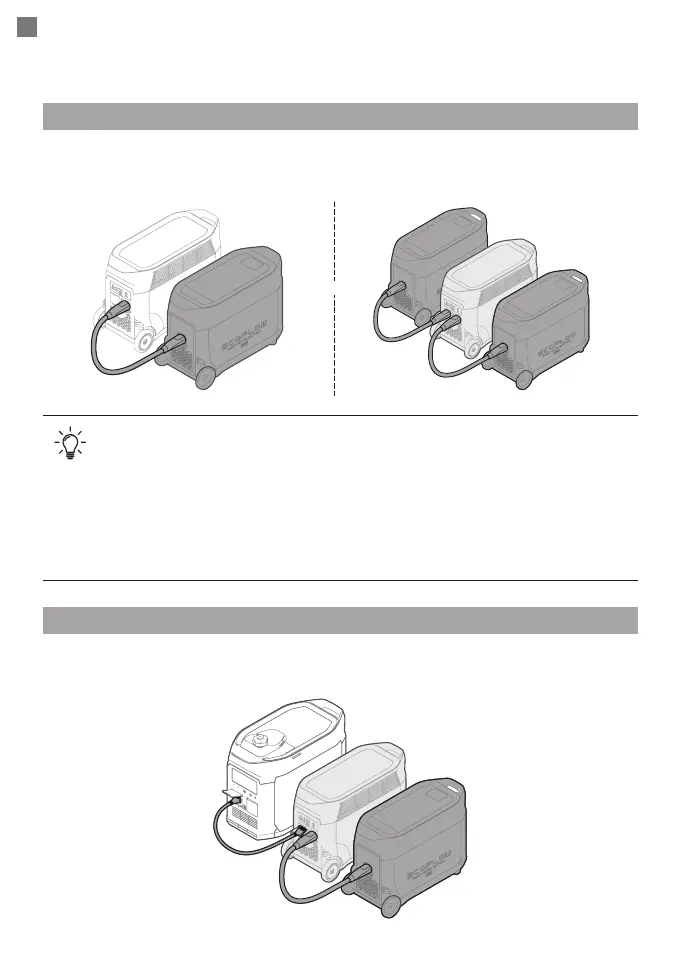
The DELTA Pro can be connected to one or two extra batteries to meet more extensive
requirements.
1. Make sure both DELTA Pro and the extra battery are turned off before connection.
2. The extra battery icons will show up on LCD screens after you connect the product
to the DELTA Pro; afterwards, you can start charging or discharging.
3. Do not connect the DELTA Pro to the battery during charging/discharging process.
4. Do not touch the metal pins of the ports by hands or other objects. Gently wipe
the product clean with a clean and dry cloth when necessary.
5. Tightly connect the extra battery cable with DELTA Pro and the extra battery.
Failing to comply may heat the connection and affect the device's performance or
lead to a fire.
With DELTA Pro
With Smart Generator
Please refer to the smart generator user manual for details.
111
000...
777
000
111
000...
777
000
111
000...
777
000
or


 To Next Page