8
Starting of the Bootloader on the Ident-Ex
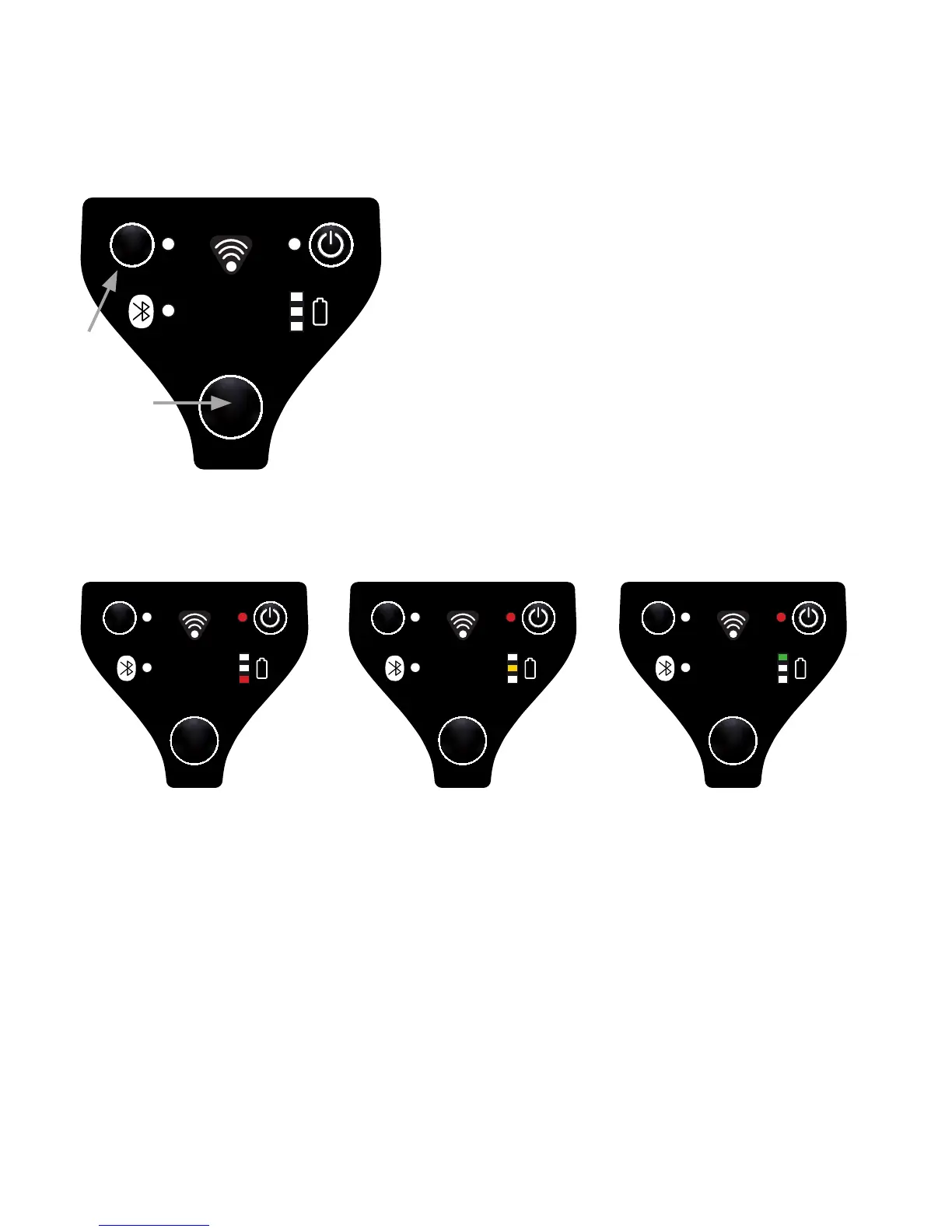
To install new rmware, the Ident-Ex has to be set in a specic condition – the
Bootloader. The Ident-Ex has to be turned off before the Bootloader can be star-
ted and is started by pressing the Trigger and SPP button simultaneously. After
than switch on the device.
As soon as the buttons are released, the Bootloader starts. (a chaser light in the
battery indicator goes from red, to yellow, to green).
Installation of new rmware for the Ident-Ex (with the computer)
Bluetooth pairing of Ident-Ex and computer
If the Ident-Ex hasn’t been paired with a PC before, the Ident-Ex and computer
have to be paired rst before the devices can be connected via Bluetooth.
Chose the Bluetooth name of the Ident-Ex through Start -> System control ->
Hardware and sound -> add Bluetooth device.
Now, the computer is coupled with Ident-Ex and a Bluetooth connection can be
set up.


 To Next Page