SPECIAL FUNCTIONS AND PROTECTION DEVICES
• Temp. Display Adjustment: If necessary, the display of actual water temperature can
be adjusted 2.4˚F (1.5˚C) up or down. Press the UP and DOWN keys at the same time for
6 seconds until the numerical display flashes. Then, press the UP or DOWN keys to adjust.
• Compressor Protection: If the compressor somehow becomes overloaded, a protection
device will automatically shut it off, then attempt a restart after about 3 minutes.
• Sensor Circuit Protection: If the water temperature sensor has an open or broken circuit,
the chiller will shut down and a “P1” or “P2” error message will be displayed.
Operation
6
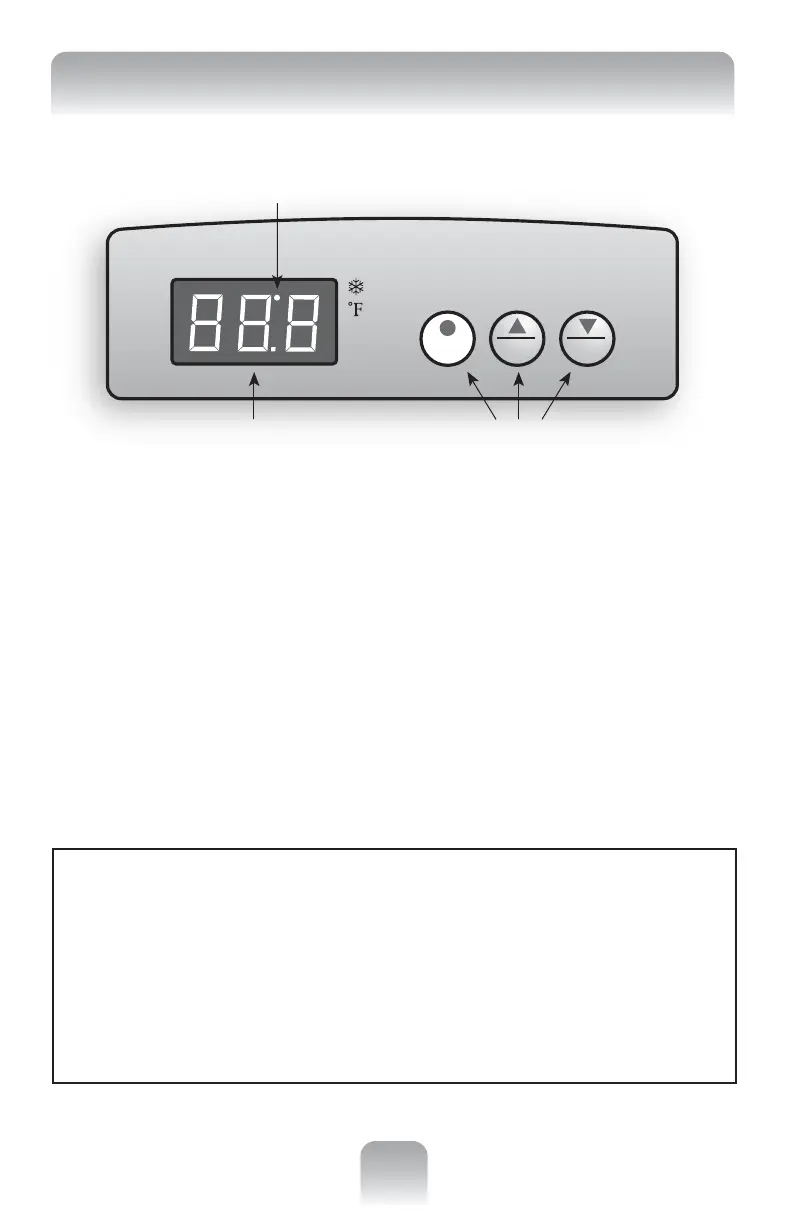
USING THE DIGITAL CONTROL PANEL
Setting Water Temperature: To enter a temperature setting, press the SET button and hold
for more than 3 seconds. The previously set temperature will appear on the display. Press the UP
or DOWN key to enter a new temperature setting from 37-90˚F (3-32˚C). To accept, press the SET
button again (or just wait about 8 seconds and it will automatically store your new setting and
revert to normal operation). The actual water temperature displays continuously while the chiller
is working. To Compare Actual and Set Water Temperatures: Press the SET button once. The set
temperature will appear, alternating with a display of the actual water temperature (when actual
water temperature is displayed the “Cooling” indicator light goes OFF – when the set
temperature is displayed the same indicator FLASHES).
Automatic Temperature Control: When the compressor stops for over 3 minutes and water
temperature rises 1˚F above the set temperature, the chiller will automatically restart. Once the
set water temperature is reached, the “Cooling” indicator light will go off and the compressor
will stop. NOTE: The “Cooling” indicator light will also flash if any protection device (see below)
is activated for at least 3 minutes.
SET
UP
DOWN
3-Digit Temperature Display
“Cooling” Indicator Light
Temperature Adjustment Buttons



 To Next Page