42EN
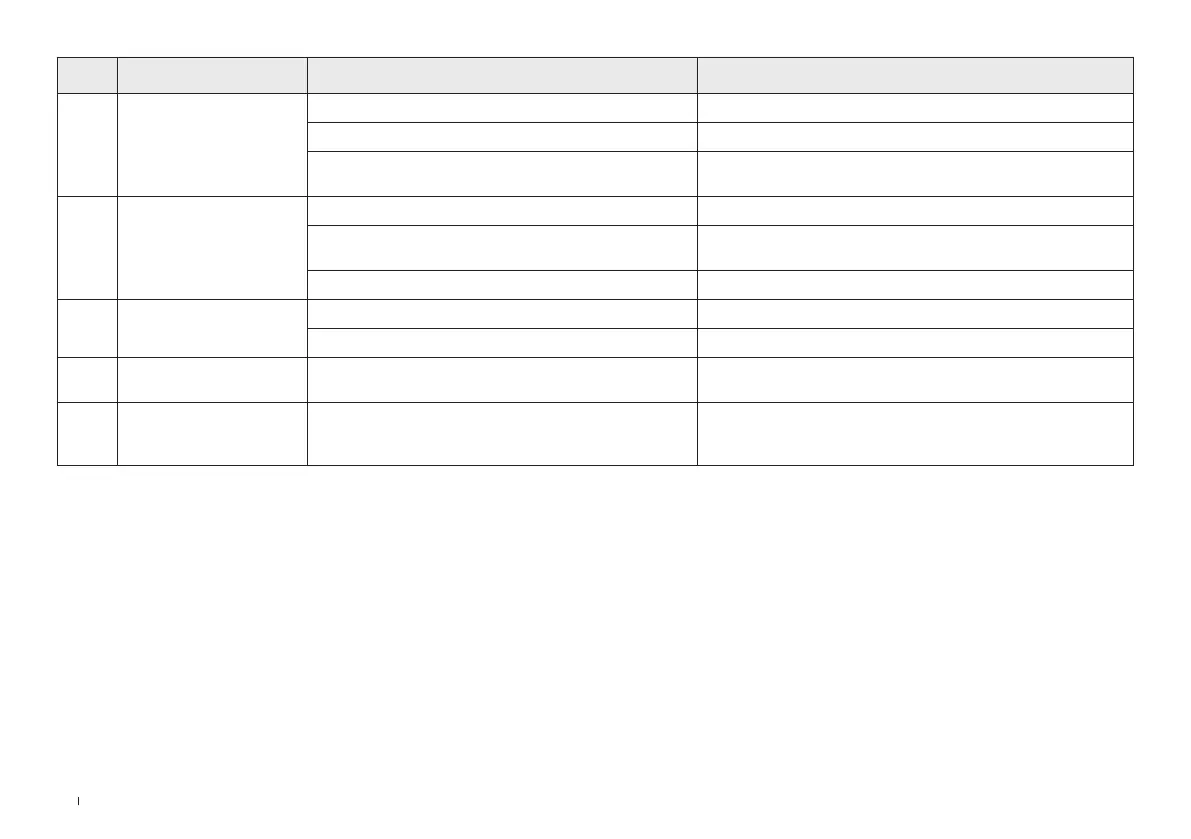
No. Malfunction Possible Causes Solutions
22
The vacuum cleaner does
not turn on�
No power� Charge the battery�
Auto protection for overheating� Restart after cooling down�
The appliance is blocked
(i�e� the tube, suction mouth or some other parts)�
Check and remove blockages�
23
Weak suction power of
vacuum cleaner�
Dustbin and filters are full� Clean the Dustbin and filters�
The appliance is blocked
(i�e� the tube, suction mouth or some other parts)�
Remove blockages�
The brush roller tangled with hairs or fibers� Clean the brush roller�
24
Battery of vacuum cleaner
won’t charge�
The adaptor is not correctly inserted� Reinsert the adaptor correctly�
Vacuum is not properly placed on the dock� Pull the vacuum up and place it back on the dock again�
25
Abnormal motor sounds of
vacuum cleaner�
The appliance is blocked (i�e� the tube, suction mouth or
some other parts)�
Remove blockages�
26
Malfunction Indicator Light
on vacuum cleaner is on�
Something is wrong� Please contact customer service�






 To Next Page