Home
ECOWITT
Temperature Controller
WN34BL
Page 10
ECOWITT WN34BL - Page 10
21 pages
Manual
Save Page as PDF
To Next Page
To Next Page
To Previous Page
To Previous Page
Loading...
10
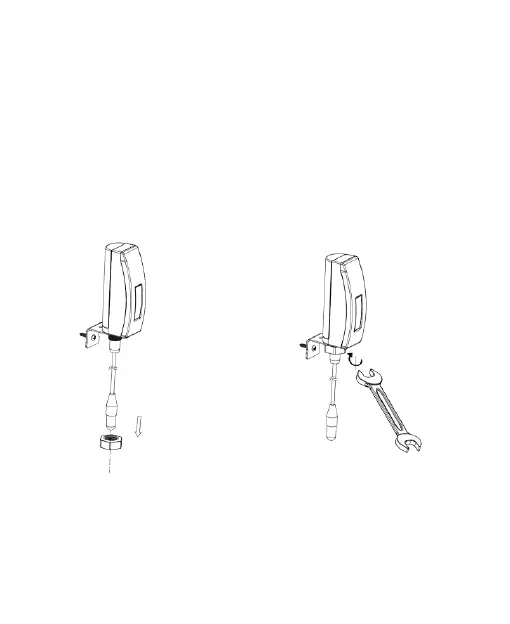
Fix
the
sensor
t
o
the
bracket
with
the
Hexagon
M12
nut
and
ti
ght
en
the
screw
as
shown on
figure 3-2
:
(
hand turn
the nut
until
firm,
and
then
use
a
wrench
to
turn
1/3
~
1/2
turn
and
no
more.
Do
not
over
tighten.
)
Figure 3-
2
:
Sensor mounti
ng
9
11
Table of Contents
Main Page
Table of Contents
1
Getting Started
2
Parts List
2
Overview
3
Features
4
Setup Guide
6
Installing Battery
6
Sensor Placement
9
Wi-Fi Configuration with Gateway
12
Pair with Gateway
12
Wi-Fi Connection for the Gateway
14
View Online Data with WS View
14
Set Email Alerts
16
Specification
17
W FCC Statement
18
Related product manuals
ECOWITT WH45
23 pages
ECOWITT WH0310
28 pages



 To Next Page