
 Need help?
Do you have a question about the EcoxGear 2.5 Marine and is the answer not in the manual?
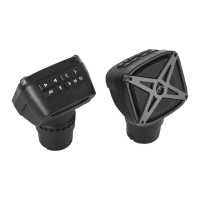
The ECOXGEAR 2.5 Marine GDI-EXYMH2X25 is a pair of mounted Bluetooth speakers designed for both indoor and outdoor use, including land and water environments. These speakers are built to be waterproof and dustproof, making them suitable for marine applications and other challenging conditions.
The primary function of the ECOXGEAR 2.5 Marine speakers is to provide high-quality audio playback wirelessly via Bluetooth. They are designed to be mounted, offering a robust and secure audio solution. Each speaker features a separate Master Power Switch and a Standby Button for power control. The Master Power Switch, located under a cap on the back panel, must be in the ON position for the speakers to operate. Once the Master Power is on, the Standby Button on the top panel can be used to turn the unit On/Off.
The speakers support Bluetooth CSR 4.2, allowing for wireless connection to smart devices. When powered on, they automatically search for a Bluetooth connection and are ready to pair. Two "ECOXGEAR" options will be available on your smart device for connection. Once connected, the speakers will announce "Connection successful," and you can play your desired audio. If the LED is not flashing or if you wish to pair with a new device, pressing and releasing the Bluetooth button on the top panel will put the speakers into pairing mode, announcing "Ready to connect." The speakers remember the last paired device and will automatically attempt to reconnect when turned on or when the device comes back into Bluetooth range.
In addition to Bluetooth, the speakers offer an Audio AUX-IN connection for wired audio devices using a 3.5mm cable. When using AUX-IN, the volume level must be controlled from the audio device itself.
A key feature is EcoConnect, which enables TrueWireless Stereo (TWS) functionality between two units. When both speakers are powered on and connected to a device via Bluetooth, pressing the EcoConnect Button on both speakers will initiate pairing. They will announce "EcoConnect, pairing speakers," then "Speakers paired," and finally designate one as the "left speaker" and the other as the "right speaker" for stereo sound. The EcoConnect light will turn solid blue once connected. This feature works when paired to another EcoConnect capable speaker within 30 feet and is only available when Bluetooth is the audio source.
The speakers also include control buttons on the top panel for managing playback and volume. These include buttons to decrease or increase speaker volume, and to select previous or next song tracks by pressing and holding. A Play/Pause/Answer button allows you to pause and play song tracks and answer mobile calls when paired with Bluetooth.
Battery status is indicated by four LED Battery Level Indicators on the top of the unit, each representing 25% of a charge. While charging, these LEDs will flash in succession. A separate Battery Indicator LED on the top panel shows USB connection charging status: red for charging in process and green for full charge.
To begin using the speakers, first open the cap on the bottom of both units to access the Main Power Switches. Turn these switches to the ON position. Then, press the Standby Power Button on top of each speaker to power them on. The speakers will automatically pair to each other and announce which one is the Left / Right speaker. Next, search for "ECOXGEAR" on your smart device's Bluetooth connection settings and select either option to pair. Once paired, you can start playing audio.
For optimal performance, it is recommended to fully charge the speakers before first use. Charging is done via the USB Micro port using the included USB cable and a 5V power source (such as a computer USB connection or an AC outlet with a 5V, 1A power adapter). Approximately 3 hours are needed for a full charge from a low battery. The speakers can be charged while playing audio.
When using the EcoConnect feature for stereo sound, ensure both speakers are powered on and one is connected to your device via Bluetooth. Then, press the EcoConnect Button on both speakers to establish the wireless stereo connection.
For mounting, the speakers have a 1/4" diameter mount attachment point. It is crucial to use proper ECOXGEAR mounts if you intend to mount the units.
Maintaining the waterproofness of the ECOXGEAR 2.5 Marine speakers is critical for their longevity and performance. The unit is waterproof only when the cap on the back panel is properly closed. To access the connections, turn the cap to the LEFT until the arrow point lines up with the unlocked symbol, then use the finger tab to pull it open. To ensure waterproofness, ALWAYS CLOSE THE CAP PROPERLY by turning it to the RIGHT until the arrow point lines up with the locked symbol. Do NOT open the cap if it is wet or in a wet environment, and always dry the unit completely before opening the cap.
After each use, especially in humid or water environments, properly seal the ECOXGEAR to prevent water damage to internal components. Salt water and air are particularly corrosive, so always ensure the gaskets are sealed and rinse the unit thoroughly with tap water after use in salt water or a swimming pool. Periodically check the rubber seal for premature wear and clean it with a soft moist cloth, ensuring no dirt, hair, or sand are on the rubber seal ring. Avoid using oily solvents or chemicals for cleaning.
Do NOT charge the unit if it is wet or if you suspect water has entered the device, as this could be hazardous and cause fire or a spark. If water ingress is suspected or if the unit has experienced a severe impact that may have affected its integrity, return it to Grace Digital for assessment and repair. Do NOT attempt to fix or repair the unit yourself.
Store the unit with all caps properly sealed to prevent long-term internal moisture damage. Completely dry and clean the ECOXGEAR before attempting to charge it. Do NOT remove the built-in battery or the grill covers. Avoid applying excessive force to any surfaces of the unit when wet. Do NOT use or store the unit in places with high temperatures, and avoid prolonged exposure to ultraviolet radiation (UV sunlight) and strong magnetic fields.
For extended periods of non-use, turn the Master Power Switch OFF to preserve battery life. The product has a limited life span and should be replaced when it shows obvious signs of wear. Do not modify or remove any original component parts of the speaker, as this could cause damage and void the warranty.
 General
| Type | Portable Bluetooth Speaker |
|---|---|
| Brand | ECOXGEAR |
| Category | Speakers |
| Charging Time | 4 hours |
| Built-in Microphone | Yes |
| AUX Input | Yes |
| USB Charging Port | Yes |
| Model | ECOXGEAR 2.5 Marine |
| Water Resistance | Yes |
| Waterproof | Yes |



 To Next Page