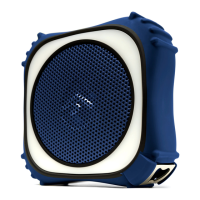
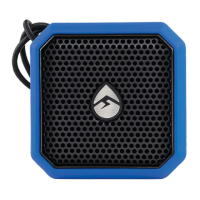
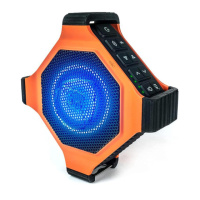
The EcoEdge+ is a portable, waterproof Bluetooth speaker designed for both indoor and outdoor use, including land and water environments. It features a rugged design and offers a range of functionalities for audio playback and connectivity.
Function Description:
The EcoEdge+ serves as a wireless speaker that connects to smart devices via Bluetooth for audio streaming. It also includes an AUX-IN port for wired connections to audio devices. A key feature is EcoConnect, which allows two EcoEdge+ speakers to be wirelessly paired for true wireless stereo (TWS) sound, providing an immersive audio experience. The device also incorporates a speakerphone function with voice assistant activation (Siri, OK Google, etc.) for hands-free calls and voice commands. Integrated LED status indicators provide information on power, battery level, Bluetooth connection, and EcoConnect status. Additionally, the EcoEdge+ includes multiple light modes, offering visual enhancements to the audio experience.
Important Technical Specifications:
- Models: GDI-EXEGPL400, GDI-EXEGPL410
- Unit Weight: 17 ounces
- Output Power: 20W Max Amp, x1 woofer (Ø3")
- S/N Ratio: 88dB +/- 3dB
- Power Source: 3.6V, 3350mAh Lithium Ion Battery
- USB Input: 5V, 1A
- Frequency Range: 125Hz-18,000Hz
- Bluetooth: Bluetooth® CSR 4.2, Up to 100 ft / 30 m range
- Play Time: Approximately 20+ hours from a full charge (over Bluetooth connection)
- Charging Time: Approximately 3 hours from low to full charge
- Mount Attachment Point: ¼” diameter
- EcoConnect (TWS): Up to 30 ft / 9.1 m between paired speakers
- Recommended Storage (Battery) Temperature: 59°F / 15°C
- Operating Temperature: 23°F to 104°F / -5°C to 40°C
- Waterproof/Dustproof Rating: IP67 (submersible in up to 3 feet of water for 30 minutes)
- Dimensions: 5.5” x 5.5” x 2.3”
Usage Features:
- Quick Start: Open the side cap, turn on the Main Power Switch, press the Standby Button, search for Bluetooth connection on your smart device, and pair & play.
- Power On/Off: The device has a Master Power Switch located under a cap on the side panel, which must be set to ON for the unit to operate. Once the Master Power is ON, the Standby Power Button on the top panel can be used to turn the unit On/Off. A green LED light and an audible "Power on" indicate activation.
- Bluetooth Pairing: When powered on, the blue LED light on the top panel will flash, indicating readiness to pair. Turn on Bluetooth on your smart device, set it to pairing mode, and select "ECOXGEAR" from the list of discovered devices. The unit will announce "Connection successful" upon completion. To enter pairing mode if the LED is not flashing, press and release the Bluetooth button on the top panel. The EcoEdge+ remembers the last paired device and will automatically search for previous connections.
- EcoConnect (Wireless Stereo Connection): To pair two EcoEdge+ speakers for surround sound, first connect one speaker to your device via Bluetooth. Then, turn on the second speaker. Once the second speaker is powered on (Bluetooth light flashing), press the EcoConnect Button on both speakers. Both speakers will announce "EcoConnect, pairing speakers," followed by "Connection successful" and "Speakers paired." The EcoConnect light will turn solid BLUE on both units. Play music from your device, and both units will play. You can cycle through four modes: STEREO, RIGHT/LEFT, LEFT/RIGHT, and MONO by pressing and holding the EcoConnect button.
- Speaker Volume: Use the and buttons to decrease or increase the speaker volume. The EcoEdge+ will beep when maximum volume is reached. Note that some Bluetooth devices may require manual volume adjustment for maximum audio level.
- Track Selection: Press the < and > buttons once to select the Previous Song track or Next Song track, respectively.
- Play/Pause/Answer/EcoTalk: Press the button once to pause/play song tracks or answer mobile calls (requires Bluetooth pairing). Press and hold the button for two seconds to activate the voice assistant on your device (Siri, OK Google, etc.). The speakerphone mic will hear your voice commands and transfer them to your device's voice assistant.
- Light Modes: Press the light button to cycle through five modes: Off, Red Light, Green Light, Music Sync, and Color Fade.
- Battery Indicator: Connect the USB cable to a power source. An LED on the top panel indicates charging status: RED for charging in process, GREEN for full charge. Additionally, four LED Battery Level Indicators on the top of the unit each represent 25% of a charge, with four full LEDs indicating a full charge.
- Audio AUX-IN: Connect an audio device using a 3.5mm cable as an alternative to Bluetooth. Volume must be controlled from the audio device.
- Charging Options: Use the included USB cable to connect to a USB outlet, a 5V AC adapter, or a computer.
Maintenance Features:
- Waterproofness: The unit is waterproof only when the cap on the side panel is properly closed. Ensure the cap fits flat and flush along the edges. If not properly closed, the unit is not watertight and may not float.
- Cleaning: After use in salt water, clean the unit thoroughly with fresh water. Properly clean the EcoXGear and ensure gaskets are free of sand, dirt, or water before storage or removing the back cover.
- Storage: Store the unit with all caps properly sealed to avoid long-term internal moisture damage.
- Charging Precautions: Completely dry and clean the EcoXGear before charging. Do NOT charge if the unit is wet or if water is suspected to have entered the unit, as this could result in electrical damage, fire, or shock.
- General Care: Avoid prolonged exposure to ultraviolet radiation (UV sunlight) and strong magnetic fields. Periodically check the rubber seal for premature wear and clean it with a soft moist cloth. Do NOT use oily solvents or chemicals. Never open the auxiliary door in a water environment. Do NOT apply excessive force to any surfaces when wet. Do NOT use or store the unit in places with high temperature.
- Repairs: Do NOT attempt to fix or repair the unit yourself. Send it back to Grace Digital for assessment and repairs if damaged or if water ingress is suspected.
- Mounting: Use only approved ECOXGEAR mounts.
- Product Lifespan: This product has a limited lifespan and should be replaced when it shows obvious signs of wear.
- Battery Safety: The EcoEdge+ has a built-in Lithium battery. The battery must NOT be used in or near an open heat source or excessive heat. Incorrect battery replacement poses a danger of explosion.

 Need help?



 To Next Page
 General