EasyManua.ls Logo

ECS N2U400-A - Connecting Case Components

ECS N2U400-A
63 pages
Print Icon
To Next Page IconTo Next Page
To Previous Page IconTo Previous Page
Loading...
9
C
C
o
o
n
n
n
n
e
e
c
c
t
t
i
i
n
n
g
g
C
C
a
a
s
s
e
e
C
C
o
o
m
m
p
p
o
o
n
n
e
e
n
n
t
t
s
s
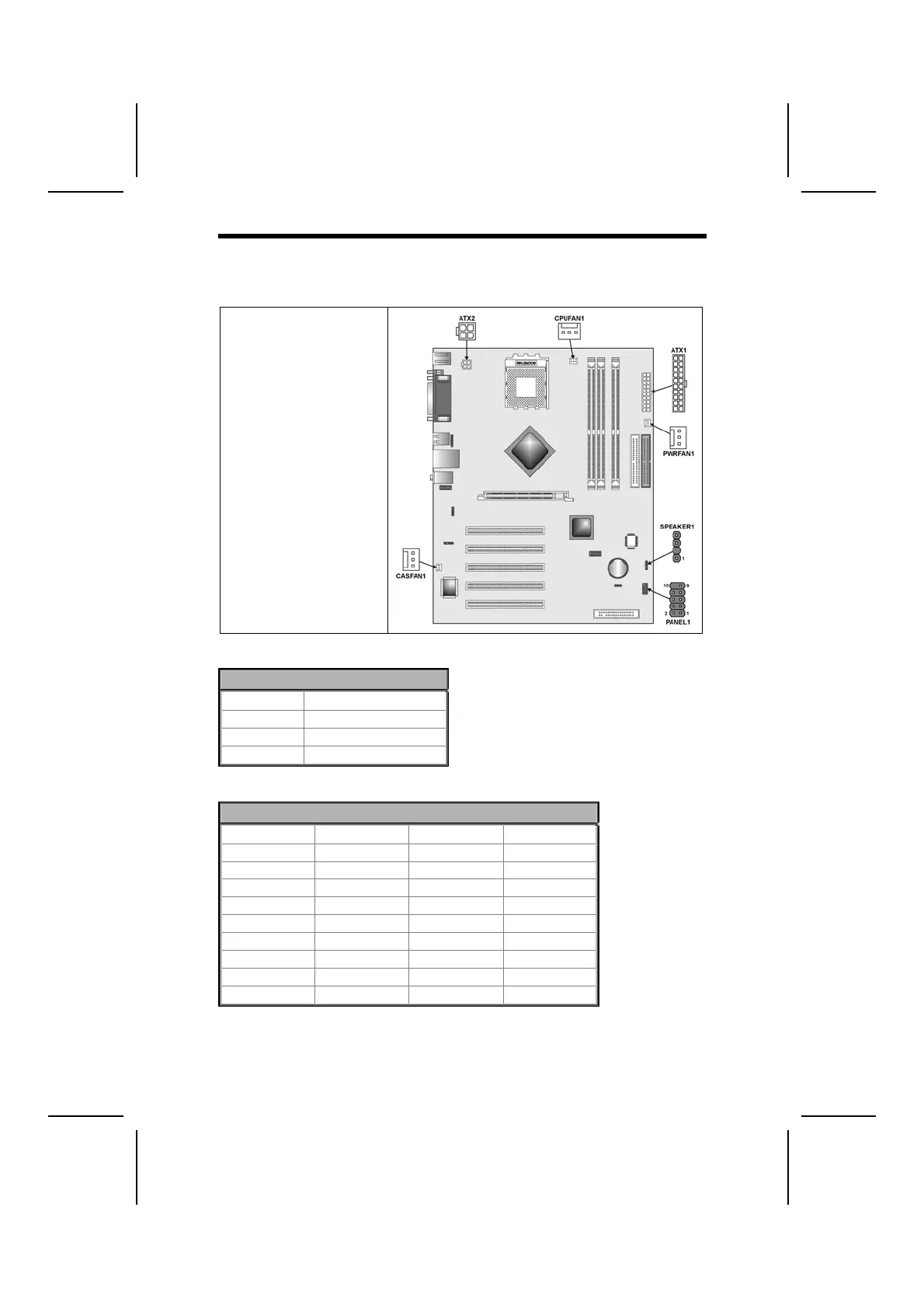
After you have installed the motherboard into a case, you can begin connect-
ing the motherboard components. Refer to the following:
1. Connect the Pentium
4 auxiliary power
supply connector to
ATX2.
2. Connect the standard
power supply connec-
tor to ATX1.
3. Connect the CPU
cooling fan cable to
CPUFAN1.
4. Connect the case
cooling fan connector
to CASFAN1.
5. Connect the power
cooling fan connector
to PWRFAN1.
6. Connect the case
speaker cable to
SPEAKER1.
7. Connect the case
switches and indicator
to PANEL1.
ATX2: ATX 12V Power Connector
Pin Signal Name
1 Ground
2 Ground
3 +12V
4 +12V
ATX1: ATX 20-pin Power Connector
Pin Signal Name Pin Signal Name
1 +3.3V 11 +3.3V
2 +3.3V 12 -12V
3 Ground 13 Ground
4 +5V 14 PS ON#
5 Ground 15 Ground
6 +5V 16 Ground
7 Ground 17 Ground
8 PWRGD 18 -5V
9 +5VSB 19 +5V
10 +12V 20 +5V

Related product manuals