21
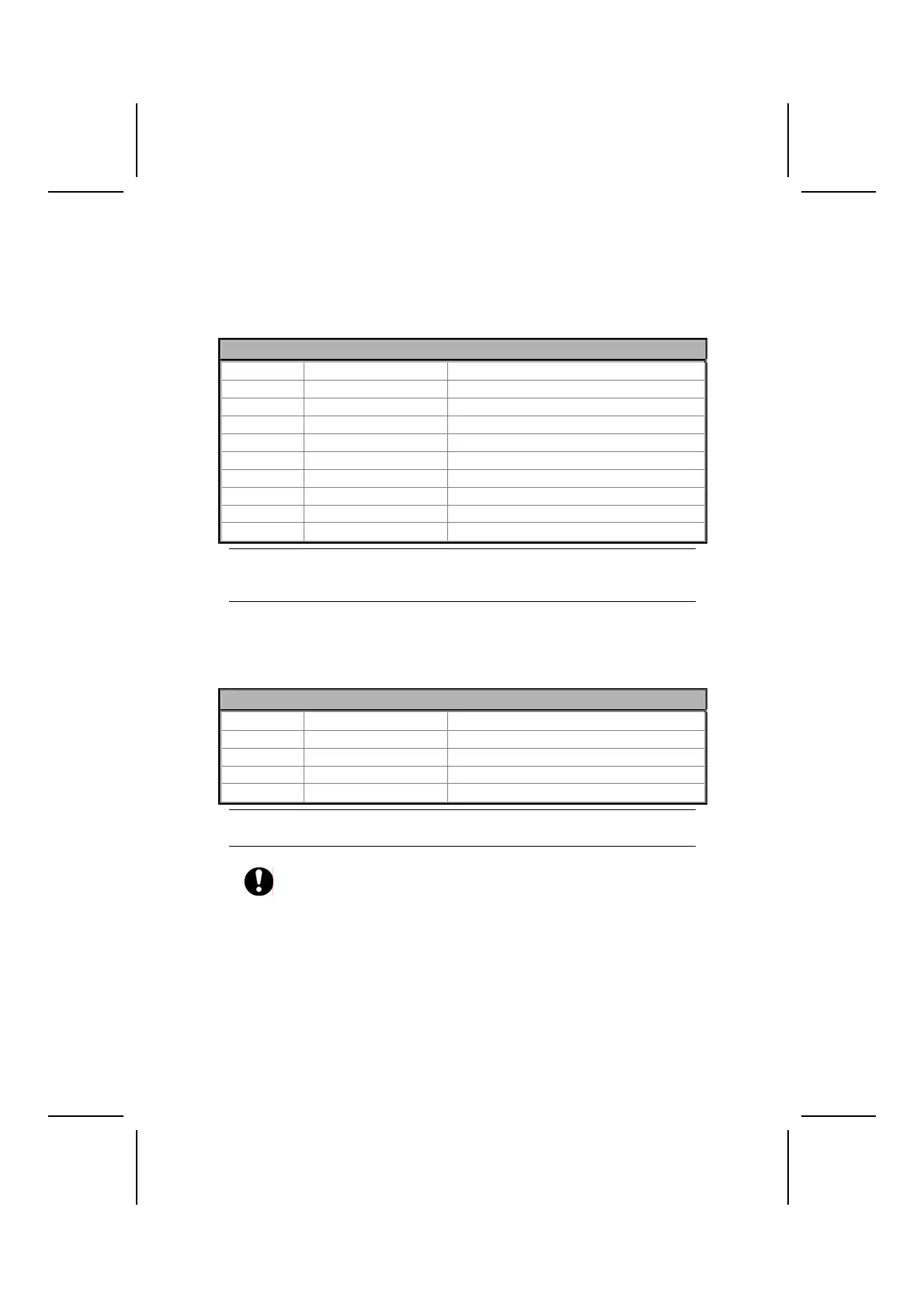
USB3: Front panel USB connectors
The motherboard has four USB ports installed on the rear edge I/O port array.
Additionally, some computer cases have USB ports at the front of the case. If
you have this kind of case, use auxiliary USB connector USB3 to connect the
front-mounted ports to the motherboard.
Pin Signal Name Function
1 VREG_FP_USBPWR0 Front Panel USB Power
2 VREG_FP_USBPWR0 Front Panel USB Power
3 USB_FP_P0- USB Port 0 Negative Signal
4 USB_FP_P1- USB Port 1 Negative Signal
5 USB_FP_P0+ USB Port 0 Positive Signal
6 USB_FP_P1+ USB Port 1 Positive Signal
7 GND Ground
8 GND Ground
9 KEY No pin
10 Not assigned Not assigned
Note: Please make sure that the USB cable has the same pin assignment as indi-
cated above. A different pin assignment may cause damage or system
hang-up.
USBCR1: USB Card Reader connector
This connector is for connecting internal USB card reader. You can use a card
reader to read or transfer files and digital images to your computer.
Pin Signal Name Function
1 USBVCC2 +5V dual
2 USB2- Data signal port 2-
3 USB2+ Data signal port 2+
4 GND Ground
5 Key No pin
Note: The USBCR1 is shared with one of the USB ports of the I/O back panel.
See “Connecting I/O Devices” for more information.
Please check the pin assignment of the cable and the USB header on
the motherboard. Make sure the pin assignment will match before plug-
ging in. Any incorrect usage may cause unexpected damage to the
system.



 To Next Page