Need help?
Do you have a question about the ECTIVE RC Series and is the answer not in the manual?
Enables comfortable on/off switching of ECTIVE power inverters from a distance.
Connect using RJ12 cable. Use original accessories for best performance.
Route remote control cable away from live cables to prevent interference.
Specifies users needing supervision and adherence to designated use.
Keep device away from children. Maintenance must be done by specialists.
Professional installation is mandatory; follow all safety regulations.
Detailed instructions on cable handling, environmental conditions, and device care.
Contact local office for complaints. Provide invoice and error description.
Damage from misuse, installation errors, or modifications is not covered.
Recycle packaging. Consult local centers for device decommissioning information.
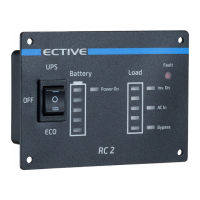
Primary button for powering the inverter on or off.
Controls ECO/UPS modes or powers down the inverter.
Displays remaining battery capacity in 20% increments.
Indicates device power status and consumption levels.
Shows current power consumption of connected devices.
Indicates when the inverter is active in battery mode.
Alerts users to any operational faults or errors.
Shows presence of AC shore power, regardless of usage.
Indicates when the mains priority circuit is active.
Indicates battery charging via the integrated charger.
Indicates battery charging via MPPT solar controller.
 General
| Brand | ECTIVE |
|---|---|
| Model | RC Series |
| Category | Remote Control |
| Language | English |

 To Next Page