EasyManua.ls Logo

edelkrone FLEXTILT HEAD 3D - Mounting the Camera; Unfold Head to Access Wheel; Attach Camera via Mounting Wheel; Height Adjustment Guidance

edelkrone FLEXTILT HEAD 3D
20 pages
Print Icon
To Next Page IconTo Next Page
To Previous Page IconTo Previous Page
Loading...
1
a
c
b
1.
2.
!
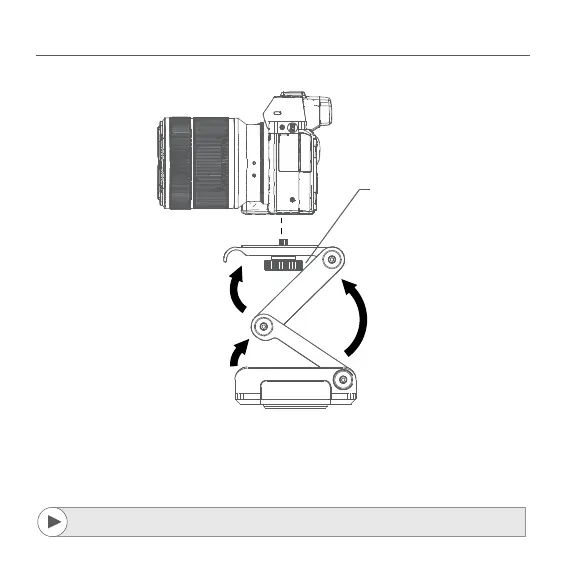
Unfold the FlexTILT Head to access the mounting wheel.
Attach your camera by turning the mounting wheel.
While adjusting height, adjust one point at a time. (a,b,c)
17. MOUNTING THE CAMERA TO YOUR FLEXTILT HEAD 3D
A detailed video explaining mounting process can be found at:
http://edel.kr/fh3d


Related product manuals