1. From page of the B70 recorder on our web-site www.ts-market.com, from section
Product files (Software) download folder «B70 soft» to the PC.
2. Unzip the folder and install (using PC administrator name) the Recorder's driver,
file B70_DrvSetup_1_0.exe.
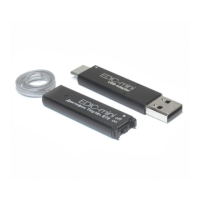
3. Slide the Recorder's cover with flash memory in the direction indicated by the arrow
and remove it off the Recorder.
4. Place the Recorder's lid onto the USB adapter of the B70 recorder
5. Connect USB adapter of the Recorder to the USB port of the PC. The adapter's
LED flashes.
6. From the 'B70 soft' folder run the EMPlus.exe program. Select type of connection
USB 2.0 Reader.
7. The Recorder's contents is on the left of the program's window. Select record and
press Play in the bottom left panel.
8. To transfer to the PC, right click the selected record and select Copy to default
folder. The record will be converted to WAV and will be in the right window of the
program.
Reset
In case of malfunction of the Recorder, disconnect and then connect power again.
Warranty
The manufacturer undertakes warranty repair liabilities for 1 year from the date
of purchase, but no longer than 2 years from the date of manufacture of the
product (warranty does not cover batteries). Paid repair is provided within recorder’s
operation lifetime (3 years). Other rules are regulated by the Law "On Protection of
Consumers' Rights".
We are always grateful for any comments and proposals regarding our products, as
well as the detailed description of the conditions and causes that led to failure. We
appreciate time and skills of our customers, and if the problem is not that complicated,
5



 To Next Page