EasyManua.ls Logo

EDIFIER TWS2 - User Manual

EDIFIER TWS2
6 pages
Print Icon
To Next Page IconTo Next Page
Loading...
TWS2
True Wireless stereo Earbuds
www.edifier.com

Other manuals for EDIFIER TWS2

Question and Answer IconNeed help?

Do you have a question about the EDIFIER TWS2 and is the answer not in the manual?

Summary

User Guide

Charge the Earbuds

During use, a flashing red light indicates low battery. Charge earbuds fully before use.

Charge the Charging Case

A flashing left light indicates low battery capacity. Charge the case promptly.

Power On;Off

Power On

Earbuds power on automatically when removed from case or by pressing multi-function button without case.

Power Off

Earbuds power off automatically in case or by holding multi-function button for 7 seconds.

Bluetooth Connection

Two Earbuds Mode

Take earbuds out to auto-turn on and TWS connect. Press left earbud button to enter pairing, then connect via phone.

One Earbud Mode

Use one earbud by taking it out of the case and following 'Two Earbuds Mode' pairing.

TWS Pairing of Left and Right Earbuds

Double press buttons on both earbuds to re-pair TWS if connection fails.

Clear Pairing Records

Press and hold buttons on both earbuds in case for 6 seconds to clear pairing.

Functional Operation Instructions

Music Playback Mode

Controls include triple press for previous track, double press for next, single press for play/pause, hold for voice assistant.

Call Mode

Single press to accept/end calls. Press and hold for 2 seconds to decline calls.

FAQs

Low Battery Indicator

Flashing red light instead of blue indicates low battery; recharge the earbuds.

Charging Indicator

Red light off during charging means earbuds are correctly placed. Sleep state requires 30 min charge to show light.

No Sound Troubleshooting

Check if earbuds are operating, volume is appropriate, connection is stable, and within working range.

Poor Call Quality

Ensure mobile phone has strong signal and earbuds are within 10m with no obstacles.

Music Control Issue

Ensure the paired device supports AVRCP (Audio/Video Remote Control Profile).

Maintenance Precautions

Product Care and Handling

Avoid humidity, extreme temps, dismantling, drops, vibration, chemicals, and scratching for product longevity.

Overview

This document describes the Edifier TWS2 True Wireless Stereo Earbuds, providing instructions for their use, charging, pairing, and maintenance.

Function Description

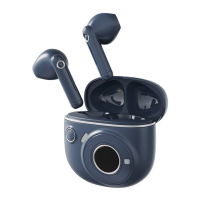
The Edifier TWS2 are true wireless stereo earbuds designed for audio playback and call management. They feature a multi-function button on each earbud for controlling various operations. The earbuds come with a charging case that not only stores them but also recharges them on the go. A USB charging cable is included for charging the case itself. The package also provides three pairs of ear tips (S, M, L) to ensure a comfortable and secure fit for different users.

Usage Features

Charging:

  • Earbuds: When the earbuds' battery is low, a red light will flash instead of a blue light. To charge, simply place the earbuds into the charging case. A steady red light indicates charging, and the light turning off means they are fully charged.
  • Charging Case: If the charging case's battery is low, a single light on the left side will flash rapidly six times. To charge the case, connect it via the USB charging cable. Indicator lights will flash and light up from left to right during charging, and a steady lit indicator means it's fully charged. It's important to dispose of rechargeable batteries properly for recycling and not to put them in fire to prevent explosions.

Power On/Off:

  • Power On: The earbuds automatically power on when taken out of the charging case. If not in the charging case, they can be powered on by pressing the multi-function button.
  • Power Off: The earbuds automatically power off when placed back into the charging case. If not in the charging case, they can be powered off by pressing and holding the multi-function button for 7 seconds.

Bluetooth Connection:

  • Two Earbuds Mode: To use both earbuds, take them out of the charging case. They will automatically turn on and establish a TWS (True Wireless Stereo) interconnection. To enter pairing state, press and hold the multi-function button of the left earbud until the red and blue lights flash rapidly. Then, search for and connect to the product model on your mobile phone. Once paired, the blue light will flash slowly. For first-time use, the earbuds will automatically enter Bluetooth pairing mode.
  • One Earbud Mode: If you wish to use only one earbud, take either the left or right earbud out of the charging case and follow the same pairing procedures as described for "Two Earbuds Mode" to connect it with your mobile phone.

TWS Pairing of Left and Right Earbuds:

The earbuds are pre-paired at the factory. However, if the wireless connection fails to resume, you can re-pair them. When not connected to a mobile phone, take both earbuds out and double-press the multi-function buttons on both the left and right earbuds. This will make the blue lights flash rapidly, indicating they are in TWS pairing state. Bring the two earbuds close to each other, and once paired, the blue lights on both earbuds will flash slowly.

Clear Pairing Records:

To clear all pairing records, place the earbuds in the charging case. Then, press and hold the multi-function buttons of both the left and right earbuds for six seconds until the blue lights flash six times rapidly. This indicates that the pairing records have been cleared.

Functional Operation Instructions:

  • Music Playback Mode (same operation for both earbuds):
    • Previous track: Triple press
    • Next track: Double press
    • Pause/play: Single press
    • Enable voice assistant: Press and hold for approximately 2 seconds
  • Call Mode (same operation for both earbuds):
    • Accept/end a call: Single press
    • End a call: Single press
    • Decline a call: Press and hold for approximately 2 seconds

Troubleshooting (FAQs):

  • Red light instead of blue light flashes: Indicates low battery; recharge the earbuds.
  • Red light is off during charging: Ensure earbuds are correctly placed in the charging case. If not used for a long time, the battery might be in sleep state and needs about 30 minutes of charging before the red light appears.
  • No sound: Check if earbuds are operating, volume is appropriate, correctly connected to mobile phone, and within normal working range.
  • Poor call quality: Check if the mobile phone has a strong signal and ensure earbuds are within effective distance (10m) with no obstacles.
  • Cannot control music playback (pause/play/previous/next track): Ensure the paired device supports the AVRCP (Audio/Video Remote Control Profile) profile.

Maintenance Features

Proper maintenance is crucial for the longevity and performance of the earbuds:

  • Humidity: Keep the product away from humid places to prevent damage to the internal circuit.
  • Sweat: Avoid using the product during intense exercise that causes excessive sweating, as sweat can damage the internal components.
  • Temperature: Do not expose the product to direct sunlight or high temperatures, as this can shorten the lifespan of electronic components, damage the battery, and deform plastic parts. Similarly, avoid cold places to prevent damage to the internal circuit board.
  • Disassembly: Do not attempt to dismantle the product. Non-professional personnel may cause damage.
  • Physical Impact: Avoid dropping, strongly vibrating, or striking the product with hard objects to prevent damage to the internal circuit.
  • Cleaning: Do not use drastic chemicals or cleaners.
  • Surface Protection: Do not use sharp objects to scratch the product surface, as this can damage the shell and affect its appearance.

EDIFIER TWS2 Specifications

General IconGeneral
Impedance32 Ω
Driver unit8 mm
Ear couplingIntraaural
Headphone frequency20 - 20000 Hz
Headphone sensitivity94 dB
Battery recharge time1.5 h
Continuous audio playback time3 h
BluetoothYes
Wireless range10 m
3.5 mm connectorNo
Bluetooth version5.0
Bluetooth profilesA2DP, AVRCP, HFP, HSP
Connectivity technologyWireless
Product colorBlack
Wearing styleIn-ear
Recommended usageCalls/Music
International Protection (IP) codeIPX4
Microphone typeBuilt-in

Related product manuals