89
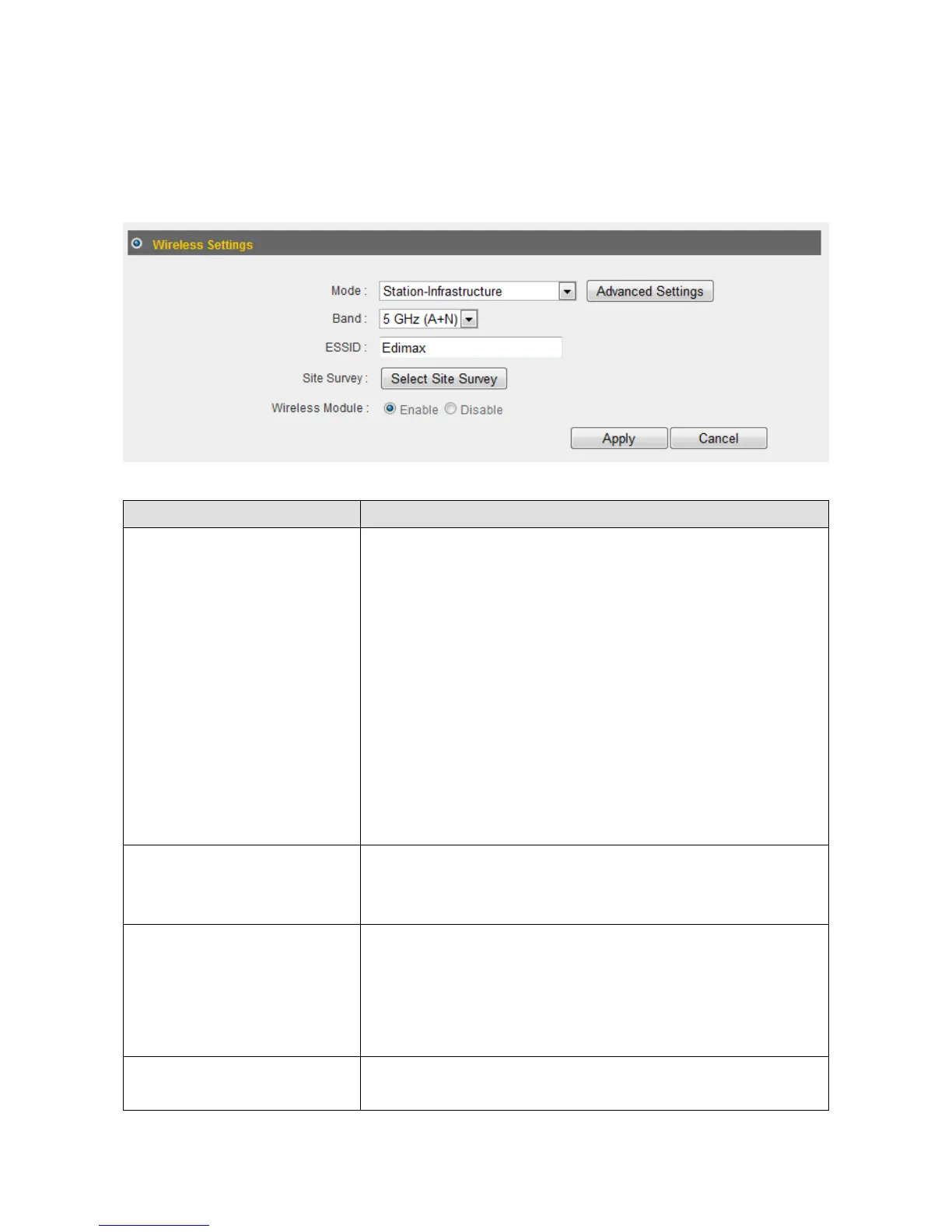
3‐5‐1‐2Station‐Infrastructure
In“Station‐Infrastructure”mode,therouteractsasbothawirelesscom munication
clientandawirelesscommunic ationserver.Thefollowingsettingswillappearin
station‐infrastructuremode:
ItemName Description
Band Selectfro moneofthefollowingoptions:
5GHz(A):Allows802.11awirelessnetworkclientsto
connecttothisrouter.
5GHz(N):Allows802.11nwirelessnetworkclientsto
connecttothisrouter(maximumtransferrate
450Mbps).
5GHz(A+N):Allows802.11aand802.11nwireless
networkclientstoconnecttothisrouter
(recommended).
ESSID Thisisthenameofyourrouter.Youcantypeany
alphanumericalcharacterhere(maximum32
characters).
SiteSurvey Click“SelectSiteSurvey”andapop‐upwindowwill
appear.Allreachablewirelessaccesspointswillbe
showninthewindow.Selectawirelessaccesspoint
fromthelist,andclick“Done”toestablisha
connection.Clicking“Refresh”willrenewthelist.
WirelessModule Select“Enable”toturnonthe5GHzwirelesssignal
andselect“Disable”toturnitoff.






 To Next Page