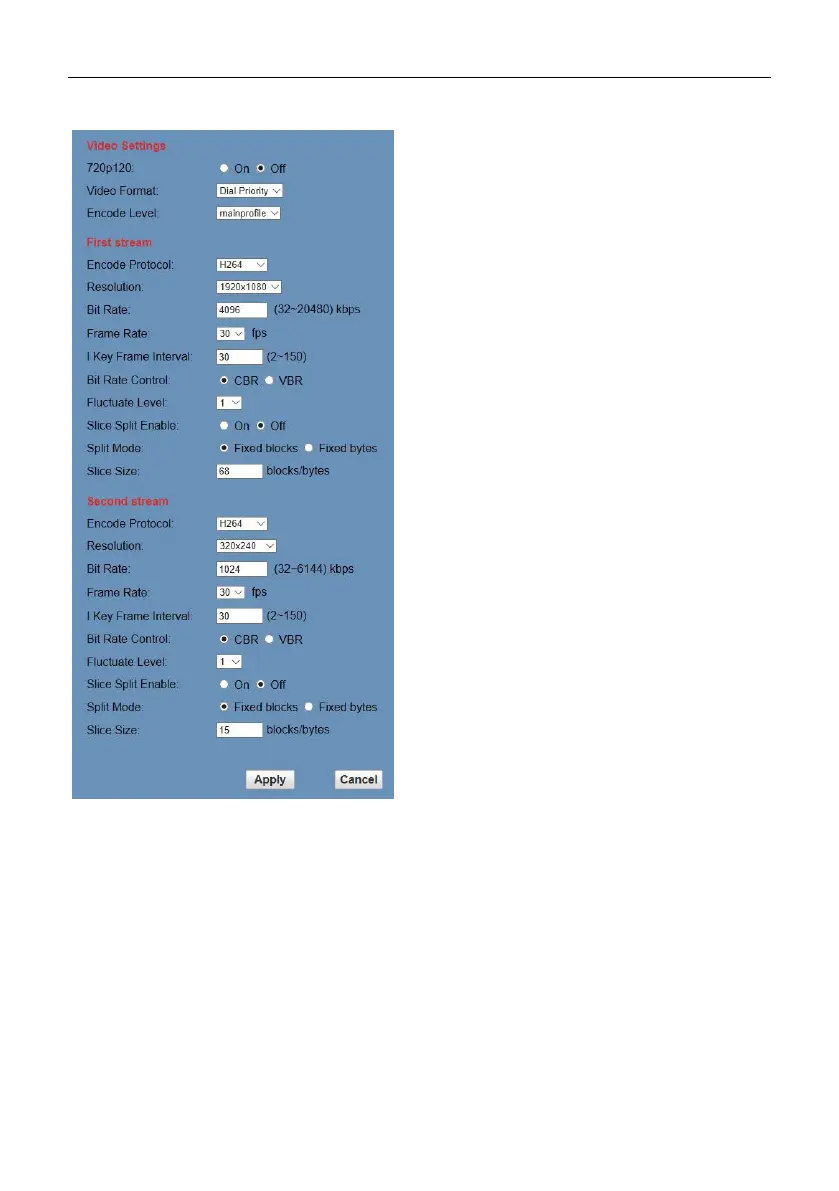
5) Resolution
First stream support
1920x1080,1280x720,1024x576,960x540,640
x480,640x360.Second stream
support1280x720, 1024x576, 720x576(50Hz
support), 720x480(60Hz support), 720x408,
640x360, 480x270, 320x240, 320x180; The
bigger resolution is, the clearer the image will
be, more network bandwidth will be taken.
6) Bit Rate
The user can specify the bit rate. Generally
speaking, the larger of the bit rate, the clearer
of the image. However, the configuration of the
bit rate needs to be combined with the network
bandwidth. When the network bandwidth is
narrow and the bit rate is configured larger, the
video stream cannot be transmitted normally,
and the visual effect is worse.
7) Frame Rate
User can specify the size of the frame rate,
generally, the frame rate greater, the image
more smooth; Frame rate is smaller, the more
sense of beating.
8) I Key Frame Interval
Set interval between 2 I frame,the bigger
interval is the response will be lower from
viewing window.
9) Bit Rate Control
Code stream control way:
Constant Bit Rate: Video coder will be coding
according to preset speed.
Variable Bit Rate: Video coder will adjust the
speed based on preset speed to gain the best
image quality.
10) Fluctuate Level
Restrain the fluctuation magnitude of variable
rate, grade 1 ~ 6.
11) Slice Split Enable
Enable or disable slice split function.


 To Next Page