• Hold the meter steady and at against
the test surface during measurement
• Do not touch the glass with your hand
while taking the reading
• Take readings at the bottom center of
the window for best thickness accuracy
(see explanation below)
• Take multiple readings to verify results
• Make sure the window being measured
is clean
• Make sure the two lenses on the back of
the GC3000 are clean. Use only clean,
compressed air to clean the lenses. Only
use a lint free cloth if absolutely neces-
sary to clean smudges, ngerprints, etc.
•
Make sure nothing is touching the far side
surface of the window during the reading
• It is best to test windows in free air (not
resting on a tabletop surface).
Recommended placement of meter:
•
Hold the meter steady AND FLAT against
the glass during measurement.
• The meter should be centered on one of
the four edges of the window with the bot-
tom edge of the meter placed parallel to
the edge of the window (please see the
image to the left). This will minimize the
effect of a concave window. As you move
away from the edge of a window, many
windows will bow inward (concave). Be-
cause the sensor runs parallel to the bot-
tom edge of the meter, it is important to
place the bottom edge of the meter along
the edge of the window as shown.
•
DO NOT touch the glass with your hand
while taking readings. Note the hand
placement used in the picture at left. The
user’s thumb is resting on the GC3000
without touching the glass being mea-
sured. Also, be sure there are no other
metallic objects touching the glass
• DO NOT hold down the button while tak-
ing a reading.
•
Place your index nger next to the button.
Incorrect placement for accurate results:
• DO NOT hold the button down while
taking a measurement. This will cause
the meter to turn off. Rest your index
nger next to the button as shown.
• DO NOT touch the glass with your hand
while taking readings. This could cause
incorrect results for the Low-E measure-
ment.
EXPLANATION OF MEASUREMENT DISPLAYS
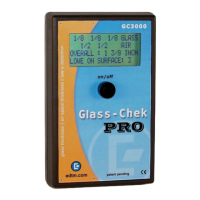
The Glass-Chek Pro offers various display formats. The following illustrations are ex-
amples of measurement displays with explanations of the application being tested and
how the display format was congured.
— Measurement Display Example One —
Display Format
• Dimensions: Inch
• Standard: Fraction
• Actual: Decimal
Application
• Double pane
window
• Soft Coat Low-E
on surface 2
— Measurement Display Example Two —
Display Format
• Dimensions: MM
• Standard: ON
• Actual: OFF
Application
• Double pane
window
• Hard Coat Low-E
on surface 3
— Measurement Display Example Three —
Display Format
• Dimensions: Inch
• Standard: Fraction
• Actual: Decimal
Application
• Triple pane
window
• Low-E on
surface 5
— Measurement Display Example Four —
Display Format
• Dimensions: MM
• Standard: OFF
• Actual: ON
Application
• Double pane
window
• No Low-E coating
• Suspended Film
between panes
Figure 2: Back of GC3000 meter with the two lenses
circled. Use clean compressed air to clean the lenses.
GUIDELINES FOR MOST ACCURATE RESULTS:
4 OPTIMAL TEST LOCATIONS FOR MOST ACCURATE RESULTS:
Double Pane
Window
Resulting Measurement Displays: Due to the ap-
plication and display format, the measurement will
alternate the following two messages:
1)
2)
Display 1 shows millimeters rounded to the nearest
standard. Since the “Actual” setting is set to OFF,
there is no display showing the actual dimensions
of the glass - only the dimensions rounded to the
nearest standard. Display 2 shows that the Low-E
coating is on surface 3 or 4. This means that the
meter is only indicating that the coating is on the
second pane of glass. To verify the exact location
of the coating, the user must test the window from
the opposite side. The meter also indicates the coat-
ing
is a hard coat Low-E.
Double Pane
Window
Resulting Measurement Displays: Due to the ap-
plication and display format, the measurement will
alternate the following three messages:
1)
2)
3)
**NOTE** On triple pane measurement displays, “P” =
Glass, and “A” = Air Space.
Display 1 shows fractional inches rounded to the near-
est
standard. Display 2 shows the actual measure-
ments in decimal inches. Notice how the actual mea-
surements
in 2 are slightly different than the mea-
surements in 1 because Display 1 shows the read-
ings rounded to the nearest standard. Display 3
shows that the meter did not detect a Low-E coat-
ing on pane 1 or pane 2. Since the GC3000 only
detects coatings on the rst 2 panes, you may be
required to test both sides of a triple pane window
to verify the presence of Low-E.
Triple Pane Window
Double Pane
with Suspended
Film
IMPORTANT SAFETY CONSIDERATION
The GLASS-CHEK family of glass thickness and air space
meters use a Class 2M laser to take its measurements.
Do NOT push the power button and point the instrument
laser at a persons’ eyes. Always check the other side of
the window being tested to ensure that no one will be
looking directly into the laser.
APPLICATIONS
WILL TEST …
• Flat glass applications
•
Clear glass or glass with Low-E coatings,
self-clean coatings or other specialty
coatings as long as the glass/coating is
transparent
• Laminated glass with Low-E coatings
positioned against the laminate (see
page 4)
• Tinted glass as long as it has a visible
light transmission value of approximate-
ly 35% or above
WON’T TEST …
• Glass coated with reective (mirror-like)
coatings
• Tinted glass with visible light transmis-
sion value at approximately 35% or be-
low
Resulting Measurement Displays: Due to the ap-
plication and display format, the measurement will
alternate the following three messages:
1)
2)
3)
Display 1 shows fractional inches rounded to the
nearest standard. Display 2 shows the actual mea-
surements in decimal inches. Notice how the actu-
al measurements in 2 are slightly different than the
measurements in 1 because Display 1 shows the
readings rounded to the nearest standard. Display
3 shows that the Low-E coating is on surface 2, and
it indicates that the coating properties are soft coat
and have the performance of double-silver Low-E.
Resulting Measurement Displays: Due to the ap-
plication and display format, the measurement will
alternate the following two messages:
1)
2)
Display 1 shows the actual dimensions of the win-
dow in millimeters. Since the “Standard” setting is
set to OFF, the standard dimensions are not dis-
played. The word “FILM” indicates suspended lm
between the two panes of glass. Display 2 indicates
both panes of glass are “CLEAR” of any Low-E
coating, but there is a suspended lm between the
panes.
PANEL 1
PANEL 2
PANE 1
Low-E
AIR SPACE
PANE 2
(
SURFACE 2
PANE 1
PANE 2
PANE 3
SURFACE 3
Low-E
(
SURFACE 5
Low-E
(
AIR SPACE 2
AIR SPACE 1
AIR SPACE
PANE 1
PANE 2
Suspended Film
(
AIR SPACE 2
AIR SPACE 1
2


 To Next Page
 Loading...