32
Why is MathShark an Important Learning Tool?
Mathematics skills are useful throughout our lives. Teaching strategies may
change, yet most educators agree that acquiring mathematics skills means
learning to:
• apply math skills outside the classroom
• develop problem-solving techniques
• inquire, analyze, and reason mathematically
• communicate mathematically
MathShark’s fast, continuous drill games and instant feedback give students
the basic tools they need to reason and problem-solve accurately and
effectively—inside and outside the classroom.
SUGGESTIONS FOR USE
MathShark can be useful in many ways. Some suggestions for incorporating
MathShark in the home or classroom are listed below:
In the Home
• Have children spend 15-30 minutes on MathShark drill games as part of their
homework schedule. The ASSESSMENT chart on pages 10-11 can help parents
and children keep track of skills review or mastery.
• Make MathShark a traveling companion—MathShark can fit in a backpack and
travel by car, train, bus, or plane.
• Encourage players to keep track of their scores (on the ASSESSMENT chart or
another piece of paper) and try to improve their times.
• Challenge family members to a friendly MathShark competition. Players choose
a SKILL and a LEVEL and see who gets the best time.
• Substitute MathShark for TV and see what happens!
In the Classroom
• Use MathShark as an individual skill builder. Five or ten minutes with
MathShark turns “free time” into a productive learning experience.
• Make MathShark a permanent feature in any Math Learning Center.
• Use MathShark for cooperative learning. Pair students and have them take
turns drilling basic math facts or specific skills and keeping a record of their
times.
• Use the MathShark ASSESSMENT chart on pages 10-11 to track students’
progress.
• Encourage students to track their own progress by comparing their times for
the first game they play at each level with games played after using the drills
practice.
MathShark
™
Guide for Teachers and Parents
Congratulations! You have chosen MathShark, the calculator and
electronic game that improves math skills.
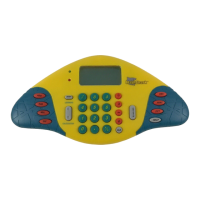
As a CALCULATOR, MathShark performs arithmetic calculations for
home or school. As a LEARNING tool, MathShark provides hundreds
of drill games, enabling students to sharpen their mental math skills—
math performed mentally rather than on paper—from memorization
to estimation to mental computation.
MathShark LEARNING is a progressive sequence of problems in seven
skills: addition, subtraction, multiplication, division, decimals,
fractions, and percents. There are thousands of problems! Self-
directed and self-motivating, MathShark gives players the confidence
to use mathematics in everyday activities.
MathShark users of all ages and skill levels find that these features
help them sharpen math skills at their own individual pace:
Repeated drill Each SKILL has eight sequential levels. At
each level, there are ten or more game sets—ten problems per
game. At the end of each game, the player can choose to replay
that game to improve timing, go to the next game on that level,
or change to another level or another skill.
Immediate feedback
Different tones and lights tell the
player whether the answer is correct or incorrect. Incorrect
answers are immediately corrected on the screen.
No-fail game format
Incorrect answers are recycled into
the game and repeated. Game play continues until all problems
are answered correctly.
Self-assessment
At the end of each game, a player’s
elapsed time is shown on the screen. The player can try to
improve that time by repeating the game.





 To Next Page