EasyManua.ls Logo

Edwards 4-NET-CAT - User Manual

Edwards 4-NET-CAT
2 pages
Print Icon
To Next Page IconTo Next Page
Loading...
© 2018 United Technologies Corporation 1 / 2 P/N 3102270-EN • REV 001 • ISS 11OCT18
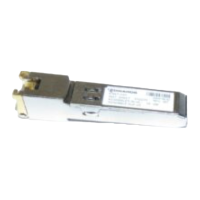
4-NET-CAT 100 Mbps SFP
Network Controller Installation
Sheet
Description
The 4-NET-CAT 100 Mbps Small Form-factor Pluggable (SFP)
network controller provides a 100Base-TX RJ-45 network connection.
Each 4-NET-CAT to 4-NET-CAT link is supervised for opens, shorts,
ground faults, and continued communications. The 4-NET-CAT
supports all command and control, live and recorded audio functions,
and live firefighters telephone network functions.
The 4-NET-CAT plugs into one SFP slot in the 4-CPU, 4-ANNCPU,
4-CPUGRPH, or the 4-NET-AD modules.
Installation
Install and wire this device in accordance with applicable national and
local codes, ordinances, and regulations.
Cautions
Equipment damage hazard. Installing or removing the SFP
controller more often than necessary may shorten its useful life.
Equipment damage hazard. This product is sensitive to
electrostatic discharge (ESD). To avoid damage, follow accepted
ESD handling procedures.
To install an SFP controller:
1. Correctly align the SFP controller with the SFP slot on the device.
SFP slots may have a latch-up or latch-down orientation.
2. Close the bale clasp, and then insert the SFP controller into the
slot until you feel the controller is seated into the connector. Firmly
press the SFP controller into the slot until the controller latches
(clicks).
3. Without releasing the bale clasp, gently pull the SFP controller to
make sure that you cannot remove it.
4. Connect the cable to the SFP.
Note: SFP modules are hot swappable
To remove an SFP controller:
1. Connect the cable to the SFP.
2. Release the bale clasp.
3. Gently pull the SFP controller out of the SFP slot.
Figure 1: 4-NET-CAT installation
(1) 4-CPU module
(2)
SFP controller
(3) Bale clasp
(4)
SFP connection on
4-CPU
Wiring
Network wiring is supervised and power-limited.
Supported wiring styles include:
Class A
Class B
Class X
Mesh networking topology
Pass-through from the CPU module eth1 and eth0 network
connections is supported from the 4-NET-CAT to any other SFP type.
Pass-through mode does not limit individual wire run lengths. Refer to
the control unit Technical Reference Manual for details.
Specifications
Current [1]
Standby/Alarm
27 mA at 24 VDC
Wiring
Cable type
Connector type
Distance
Cat 5e or better
RJ-45
328 ft. (100 m) max. between two
interfaces
Operating environment
Temperature
Relative humidity
32 to 120°F (0 to 49°C)
0 to 93% noncondensing
[1] Used for battery calculations
Question and Answer IconNeed help?

Do you have a question about the Edwards 4-NET-CAT and is the answer not in the manual?

Summary

Description

Installation

Cautions

Wiring

Specifications

Current

Provides current draw for standby/alarm status.

Wiring Specifications

Details cable type, connector type, and maximum distance for wiring.

Operating Environment

Specifies temperature and relative humidity ranges for operation.

Regulatory Information

Contact Information

Overview

The Edwards 4-NET-CAT 100 Mbps SFP Network Controller is a Small Form-factor Pluggable (SFP) device designed to provide a 100Base-TX RJ-45 network connection. This controller is integral to fire safety systems, supporting various communication and control functions within a network.

Function Description:

The primary function of the 4-NET-CAT controller is to establish and maintain network links within a fire alarm system. Each 4-NET-CAT to 4-NET-CAT link is continuously supervised for opens, shorts, ground faults, and consistent communication, ensuring the reliability and integrity of the network. This supervision is critical for fire safety applications where continuous monitoring is paramount.

The controller supports a comprehensive range of functions essential for fire safety and emergency response. These include:

  • Command and Control: Facilitates the transmission of commands and control signals throughout the network, allowing for centralized management of the fire alarm system.
  • Live and Recorded Audio Functions: Supports the transmission of live and recorded audio, which can be used for emergency announcements, evacuation instructions, or other critical communications during an event.
  • Live Firefighters Telephone Network Functions: Integrates with firefighters' telephone networks, enabling communication between firefighters and the control center, which is vital for coordinated response efforts.

The 4-NET-CAT controller is designed to plug into one SFP slot on specific modules within the Edwards system. These compatible modules include the 4-CPU, 4-ANNCPU, 4-CPUGRPH, or the 4-NET-AD modules. This modular design allows for flexible integration and expansion of the network capabilities within the overall fire alarm system architecture.

Important Technical Specifications:

  • Current Consumption:
    • Standby/Alarm: 27 mA at 24 VDC. This specification is important for battery calculations, ensuring the system's backup power supply is adequately sized.
  • Wiring:
    • Cable Type: Cat 5e or better. This specifies the minimum standard for network cabling to ensure reliable data transmission.
    • Connector Type: RJ-45. This is the standard connector for Ethernet networks, ensuring compatibility with common networking infrastructure.
    • Distance: 328 ft. (100 m) maximum between two interfaces. This defines the maximum permissible length for a single network cable segment, which is a critical consideration for network layout and design.
  • Operating Environment:
    • Temperature: 32 to 120°F (0 to 49°C). This range specifies the environmental conditions under which the device is designed to operate reliably.
    • Relative Humidity: 0 to 93% noncondensing. This indicates the acceptable humidity levels, highlighting that the device is not designed for environments with condensing humidity.
  • Network Wiring Supervision: The network wiring is supervised and power-limited, enhancing safety and reliability.
  • Supported Wiring Styles: The device supports various wiring styles, including Class A, Class B, Class X, and Mesh networking topology, offering flexibility in network design to meet different installation requirements.
  • Pass-through Mode: The 4-NET-CAT supports pass-through from the CPU module eth1 and eth0 network connections to any other SFP type. This feature does not limit individual wire run lengths, providing greater flexibility in network topology.

Usage Features:

  • Hot Swappable: SFP modules are hot swappable, meaning they can be installed or removed while the system is powered on without causing disruption. This feature simplifies maintenance and upgrades, reducing downtime.
  • Easy Installation: The installation process involves aligning the SFP controller with the slot, closing the bale clasp, inserting it until it latches (clicks), and then connecting the cable. This straightforward procedure minimizes installation time and effort.
  • Secure Connection: Once inserted, the controller latches into place, and a gentle pull confirms it is securely seated, preventing accidental disconnections.
  • Regulatory Compliance: The device complies with part 15 of the FCC Rules, ensuring it does not cause harmful interference and accepts any interference received. It is also UL/ULC listed for indoor, dry use, indicating its suitability for specific environments.

Maintenance Features:

  • Removal Procedure: The removal process is also simple, involving releasing the bale clasp and gently pulling the SFP controller out of the slot.
  • ESD Handling: The product is sensitive to electrostatic discharge (ESD). Adhering to accepted ESD handling procedures is crucial during installation and removal to prevent damage to the device.
  • Durability Caution: Frequent installation or removal of the SFP controller can shorten its useful life. This caution advises against unnecessary handling to maximize the device's longevity.
  • Supervised Network: The continuous supervision of network links (for opens, shorts, ground faults, and communication integrity) acts as a maintenance feature by providing early detection of potential network issues, allowing for proactive troubleshooting and repair.

Edwards 4-NET-CAT Specifications

General IconGeneral
BrandEdwards
Model4-NET-CAT
CategoryController
LanguageEnglish

Related product manuals