6 GETTING STARTED - SETTING UP BROADBAND
GETTING STARTED - SETTING UP BROADBAND
7
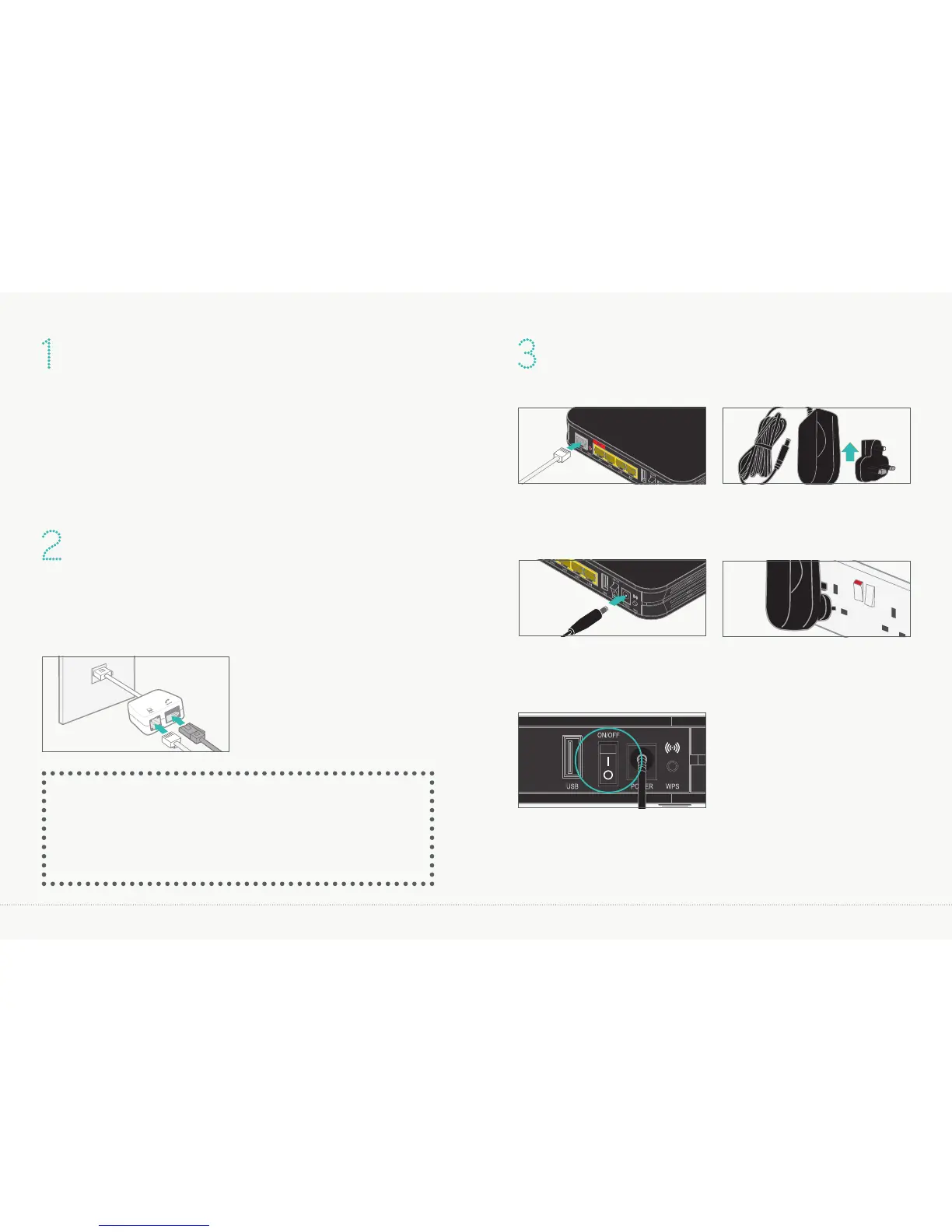
DISCONNECTING YOUR OLD EQUIPMENT
If you’ve already got a broadband modem or router connected
to your line, unplug the power supply and all other cables and
put them to one side for now. We recommend using the
broadband filters provided in the box, especially to connect your
new router. You can leave existing filters connected to other
telephone sockets.
CONNECTING YOUR NEW EQUIPMENT
2.1 Connect the broadband filter to the telephone socket.
2.2 Connect the grey broadband cable to the broadband filter.
2.3 Connect a telephone cable to the other available socket.
2 .1
2.2
2.3
(optional)
TOP TIP
Connect your router to the main phone socket for better broadband speeds.
Make sure to have a broadband filter connected to all sockets in use, this
includes those for telephones, answerphones, TV box’s and alarm systems.
CONNECT AND TURN ON YOUR ROUTER
Plug the other end of the
grey broadband cable into the
socket on your router.
Connect the two parts of the
power supply together.
Plug the power cable into the
router.
Connect the power supply
into a plug socket and turn
it on.
You can now switch
on your router.
3.1 3.2
3.3 3.4
3.5



 To Next Page