EN NUVOLA TOUCH OPERATING AND MAINTENANCE MANUAL
42
The data and features referred to are not binding on EFFEGIBI and the company reserves the right to make any appropriate changes without having to give prior warning or replace this manual.
6.2 PROGRAMMING
The Effegibi Experience My Hammam app makes it possible to programme the Hammam to switch on at a
precise time on a particular day of the week.
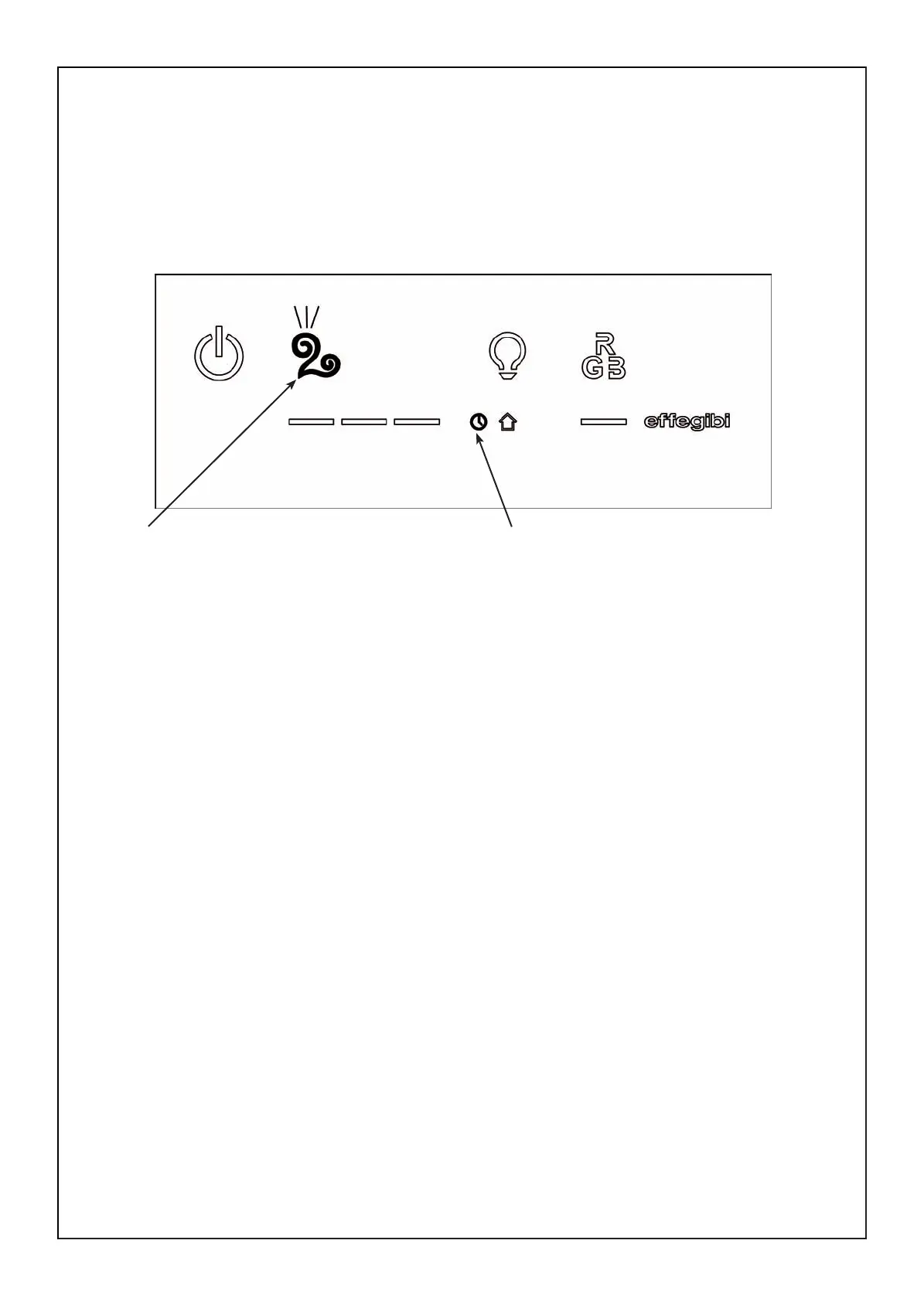
At 3.00am on the programmed day, the control panel will switch on, the clock icon will light up and the Ham-
mam button will ash, indicating the programming (see fig. M).
fig. M
Programming activated icon Hammam button ashing
The daily programming can be deactivated by switching off the control panel using the ON/OFF button.
The Hammam/Turkish bath can also be used when the programming icon is lit up, but if the daily programming
is still required, the control panel must not be switched off at the end of the session, otherwise the programming
will be cancelled.
If one daily program is deactivated, all the settings for that day will be cancelled.
If a new program has been set for the following day, the panel will switch on at 3.00am on that day.
N.B.: programs are controlled by the ECC - Effegibi Comfort Control function, which, if disabled, will cancel
them.
MANUALE USO NUVOLA TOUCH.indd 42 27/02/2014 14:29:19


 To Next Page