Pagina 19 di 28
12.5 SETTING OF THE COOKING PROGRAMS
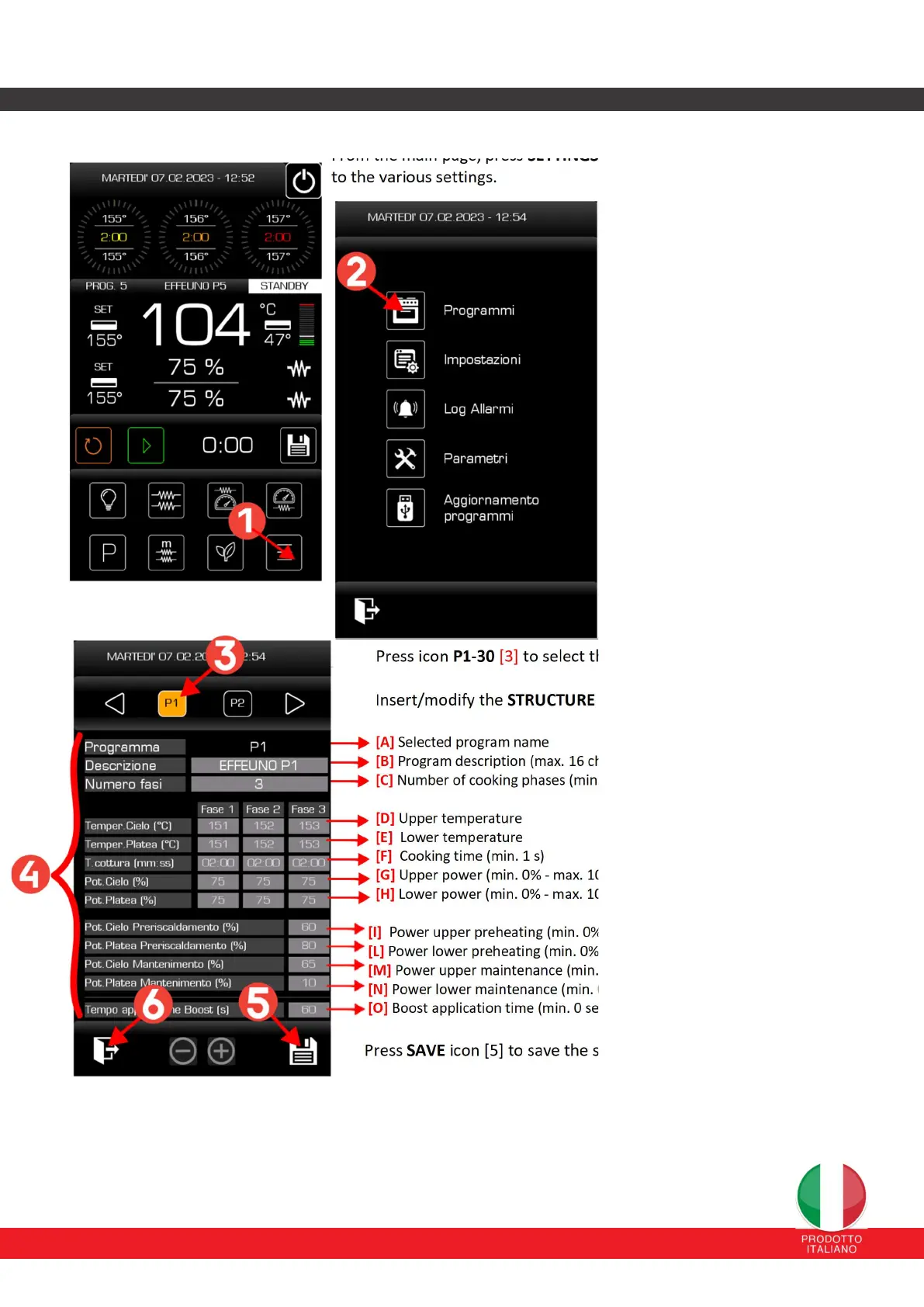
From the main page, press SETTINGS icon [1] to access the page dedicated
to the various settings.
Press PROGRAMS icon [2] to access
the page dedicated to program
configuration.
Press icon P1-30 [3] to select the program to create/modify.
Insert/modify the STRUCTURE [4] of the program:
[A] Selected program name
[B] Program description (max. 16 characters)
[C] Number of cooking phases (min. 1 – max 3)
[D] Upper temperature
[E] Lower temperature
[F] Cooking time (min. 1 s)
[G] Upper power (min. 0% - max. 100%)
[H] Lower power (min. 0% - max. 100%)
[I] Power upper preheating (min. 0% - max. 100%)
[L] Power lower preheating (min. 0% - max. 100%)
[M] Power upper maintenance (min. 0% - max. 100%)
[N] Power lower maintenance (min. 0% - max. 100%)
[O] Boost application time (min. 0 sec – max. 180 sec)
Press SAVE icon [5] to save the set parameters.
Press the EXIT icon [6] twice to return to the main page.


 To Next Page