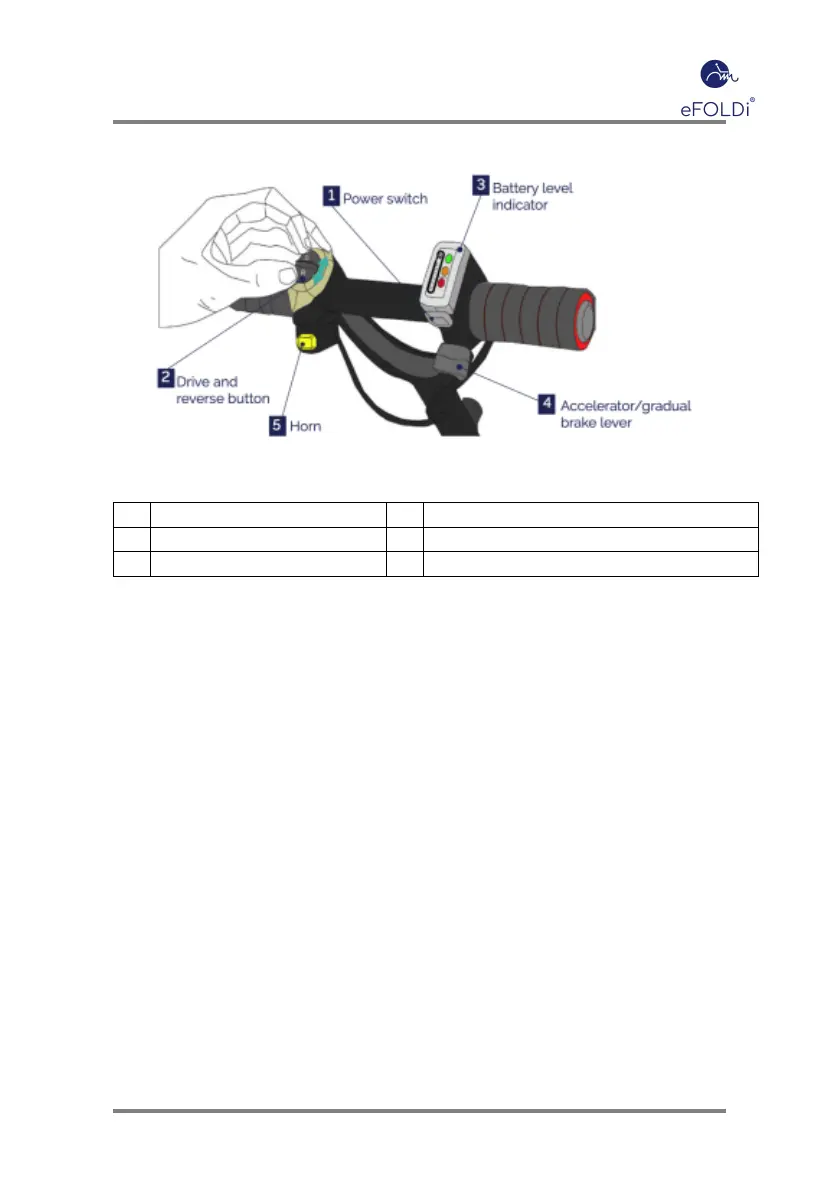
1 Power switch 2 Drive and reverse button
3 Battery level indicator 4 Accelerator/gradual brake lever
5 Horn
Table 2: Model Lite Control bar
• Power switch (1) works by pushing the button underneath the bat-
tery level indicator.
• Drive and reverse button (2) works by pushing the button forward
into the D position to Drive, R position to Reverse. Change between
D and R only works when the scooter is stationary.
• Battery indicator (3) shows you how much battery there is left for
usage. When the battery is fully charged all three lights will illumi-
nate. When a single red light is shown the battery will soon need
charging.
• Accelerator/gradual brake lever (4) is pressed the vehicle will drive,
reaching a maximum speed of 4mph. The braking system will work
gradually, as soon as the lever is released.
• Horn (5) works by pressing the yellow button under the drive and
reverse button.
Page 18


 To Next Page