UNLOCK TAKEOFF RETURN LAND FOLLOW HOVER
MODE
DISTANCE HEIGHT SPEED TIME
Note: Control buttons do not operate when they are grayed out.
Gimbal Roll
GHOST Drone Yaw Control
GHOST Drone Elevation Control
Micro-Control
Gimbal Pitch
GHOST APP
19
2
3
4
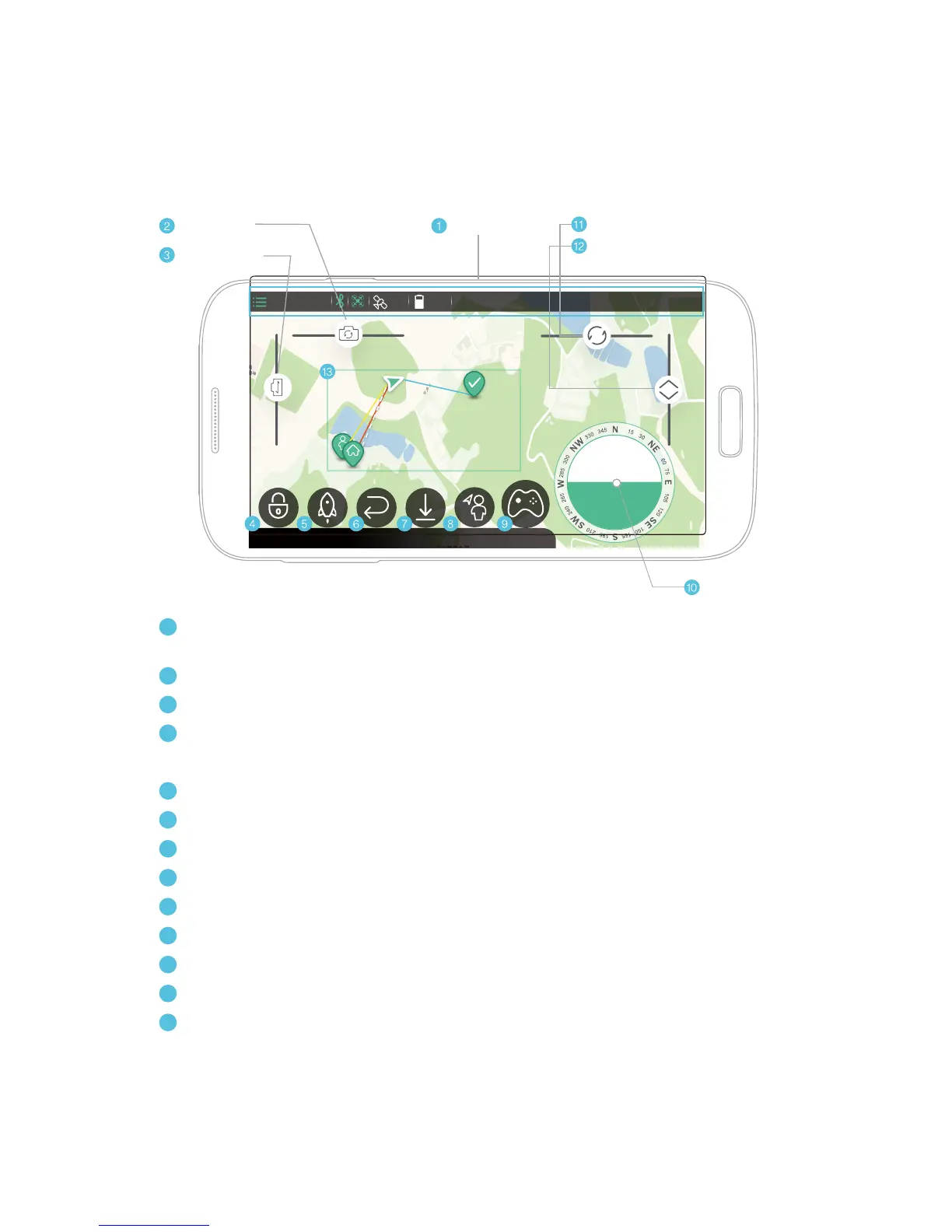
Status Bar: Settings, Flight mode, Bluetooth, “Heartbeat”, Number of Satellites,
Battery Level, Flight Distance, Altitude, Speed, Flight Time.
Gimbal: Control gimbal roll
Gimbal: Control gimbal pitch
Lock: Stop propellers
Unlock: Start propellers
Takeoff: Take off and hover at 10m (33 ft.)
Return: Returns and hovers at 10m (33 ft.) above the takeoff point
Land: Descend and land
Follow: Auto-follow
Hover: Stay in the current position
Micro-Control:
Functions similarly to a remote control joystick.
Rotate: Yaw control
Elevation: Adjust altitude
White dotted line: The GHOST Drone flight path
Blue Line: Directional heading
Red Line: The distance between drone and takeoff point
Yellow Line: The distance between GHOST drone and GHOST App
5
6
7
8
9
1
10
11
12
13
Status Bar


 To Next Page