TAKEOFF
HOVER
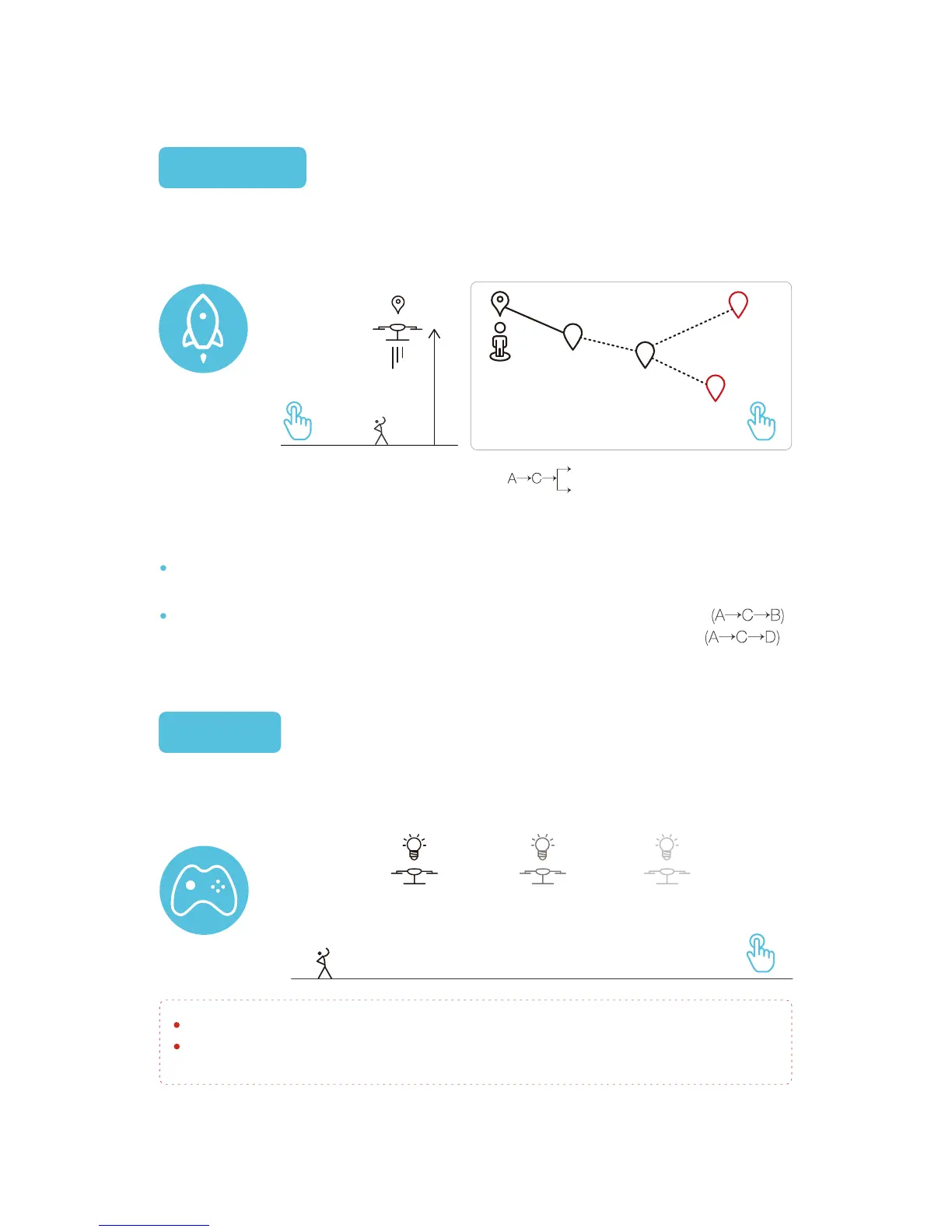
If the mobile device has network access, a map of your current area will populate,
overlaid with your position and the position of the GHOST Drone.
A is drone position. Drone will go to the position B after setting waypoint. B.
The Ghost will go to D if you set a new destination D during transit to B.
21
D(alternative destination)
B(destination)
Note:Once airborne, the GHOST Drone can receive point-to-point flight instruc-
tions. Waypoint flight requires the GHOST Drone to be 10m (33 ft.) or higher.
Please be aware of any obstructions during flight to avoid a collision.
In case of emergency, use the hover function to stop your GHOST and assess your flight
situation.
Click the “Takeoff” button after “Unlock.” After the takeoff countdown, the GHOST will
rise and hover 10m (33 ft.) above the takeoff point.
You can tap the “Hover” button at any point during flight. If you do so, the GHOST Drone
will begin hovering immediately at its current position.
Tap to Add Waypoint
A
C
D
B
Hover Anytime
10m
Takeoff
Ascending


 To Next Page