EasyManua.ls Logo

ei3 IAA-30-N-S14 - User Manual

Default Icon
26 pages
Print Icon
To Next Page IconTo Next Page
Loading...
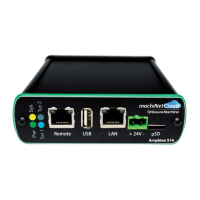
Amphion S14
S14-H (green box)
S14-N (red box)
S14-C (black box)
User Guide
ei
3
Part Numbers
IAA-254-H-S14
IAA-30-N-S14
IAA-30-C-S14
© 2019 ei
3
Corporation
Version 2.0

Questions and Answers

  • D
    ddunlapAug 9, 2025
    What to do if the Ethernet Link LED is not on for ei3 IAA-30-N-S14?
    • O
      osbornedanielleAug 9, 2025
      If the Ethernet Link LED is not lit, the cause may be incorrect network wiring or a bad port. You should check the cables and switches. It could also be due to improper configuration of the IP address settings on the Amphion. If this is the case, correct the settings or use the IP Config test and contact your ei3 administrator.
  • E
    emily64Aug 15, 2025
    Why is the Blue Tunnel LED not on for my ei3 Network Hardware?
    • T
      Timothy CruzAug 15, 2025
      The Blue Tunnel LED might not be on due to several reasons. It could be that the local network cables, switches, or facility firewall rules are not correct. Check the cables and switches in the LAN, and consult with your local IT department regarding the firewall settings. Also, the IP information configured in S14 might be incorrect. Carefully check the IP configuration or reconfigure the device using the USB drive method with a newly generated configuration file. Another possible cause is that traffic is being blocked on SFLAN or a local facility Firewall. Reboot the device and perform a Ping test, then contact local IT. Finally, the LAN might not permit internet access. Perform the IP Config test.
  • R
    Ryan GonzalezAug 21, 2025
    How to fix ei3 Network Hardware when the Green System LED is not on?
    • D
      Diane NixonAug 21, 2025
      If the Green System LED is not on, it indicates that the Amphion is not running. Try rebooting the device by cycling the power.
  • K
    Katherine GriffithAug 27, 2025
    What to do if the Ethernet Link network activity LED is not flashing on my ei3 IAA-30-N-S14 Network Hardware?
    • D
      David BlackwellAug 27, 2025
      If the Ethernet Link network activity LED is not flashing, it could be due to a lack of Ethernet network activity or a wiring problem. Check the cables and switches, and verify if traffic should be occurring on the connected devices.
  • C
    Christopher WilliamsSep 2, 2025
    How to troubleshoot ei3 IAA-30-N-S14 Network Hardware with Yellow Power LED not on?
    • J
      Jill MelendezSep 2, 2025
      If the Yellow Power LED is not on, this indicates that there is no power or incorrect power to the 24VDC terminals. Check for the correct 24VDC power supply and wiring.

Summary

Amphion S14 Specifications

Amphion S14-H (Green Box)

Remote Service Security Device (RSSD) for secure factory to cloud connection.

Amphion S14-N (Red Box)

Machine Router Firewall Device (MRFD) for machine to cloud connection.

Amphion S14-C (Black Box)

Combines S14-H and S14-N functionality for single machine use.

Electrical and Grounding

Electrical Requirements

Device requires regulated 24VDC power source within a Limited Energy Circuit.

Grounding Requirements

Case and circuit are grounded; use shielded CAT-5 cable and proper grounding methods.

Networking and Connectivity

Terminations

Amphion Wiring and Placement

Configuration

Installation and Operation

Troubleshooting

Troubleshooting Steps

Provides a systematic guide to diagnose and resolve common issues based on LED indications.

IP Configuration Test

ei3 IAA-30-N-S14 Specifications

General IconGeneral
Product TypeIndustrial Ethernet Switch
Connectivity TechnologyWired
InterfaceM12
ShieldingShielded
IP RatingIP67
Cable GlandM12
Data Link ProtocolEthernet
MaterialMetal

Related product manuals