EasyManua.ls Logo

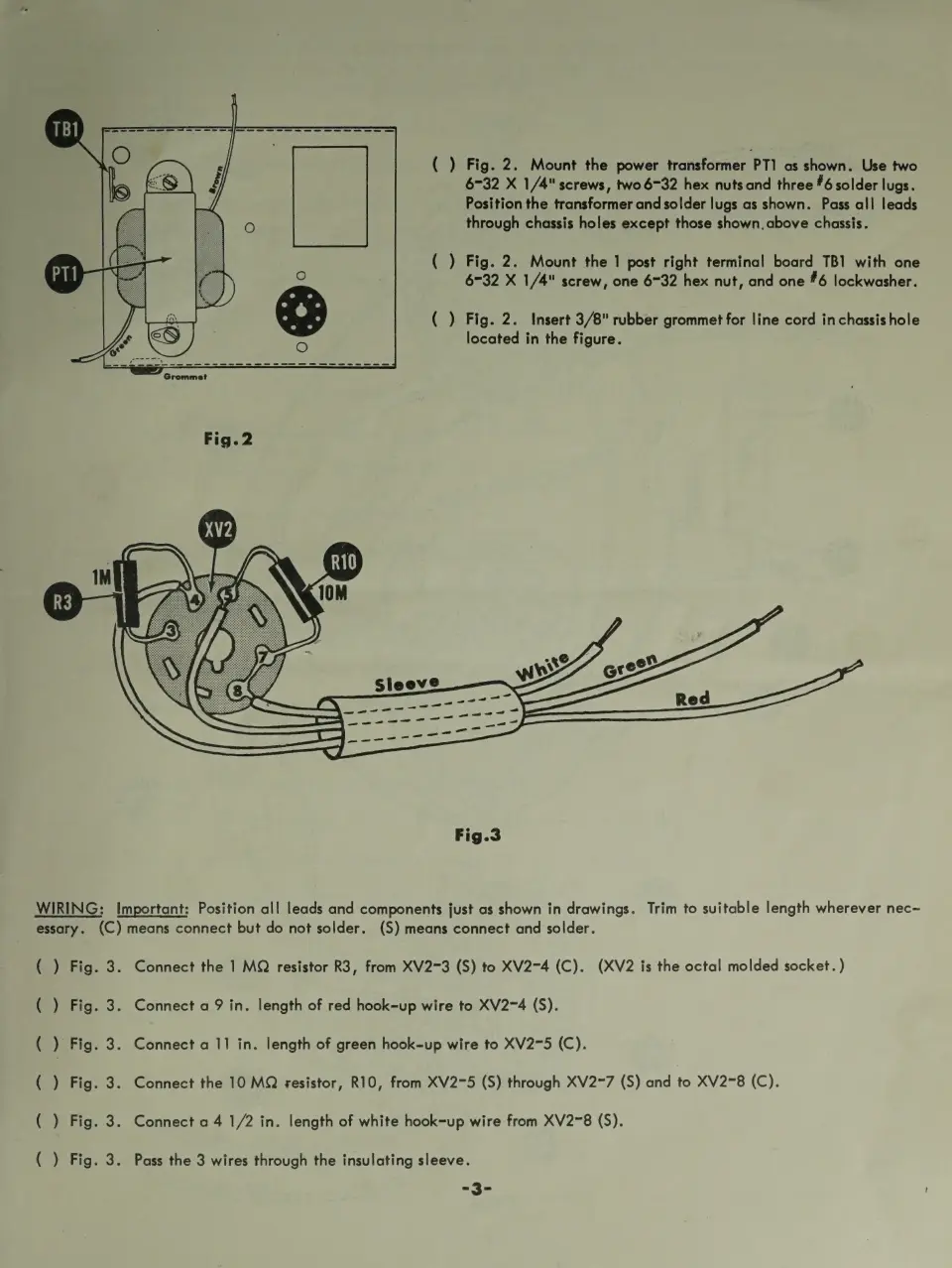
Eico 950B - Transformer and Terminal Board Mounting (Fig. 2); Wiring Components (Fig. 3)

Eico 950B
30 pages
Print Icon
To Next Page IconTo Next Page
To Previous Page IconTo Previous Page
Loading...
( )
Fig.
2.
Mount
the
power
transformer
PT]
as
shown.
Use
two
6-32
X
1/4"
screws,
two
6732
hex
nuts
and
three
#6
solder
lugs.
Position
the
transformer
and
solder
lugs
as
shown.
Pass
all
leads
through
chassis
holes
except
those
shown.
above
chassis.
(
)
Fig.
2.
Mount
the
1
post
right
terminal
board
TB1
with
one
6-32
X
1/4"
screw,
one
6732
hex
nut,
and
one
#6
lockwasher.
(
)
Fig.
2.
Insert
3/8"
rubber
grommet
for
line
cord
in
chassis
hole
located
in
the
figure.
Fig.3
WIRING:
Important:
Position
all
leads
and
components
just
as
shown
in
drawings.
Trim
to
suitable
length
wherever
nec~
essary.
(C)
means
connect
but
do
not
solder.
(S)
means
connect
and
solder.
()
Fig.
te
Fig.
()
Fig.
()
Fig.
()
Fig.
(
)
Fig.
3.
3.
3.
os
Connect
the
1
MQ
resistor
R3,
from
XV273
(S)
to
XV274
(C).
(XV2
is
the
octal
molded
socket.
)
Connect
a
9
in.
length
of
red
hook-up
wire
to
XV2~4
(S).
Connect
a
11
in.
length
of
green
hook-up
wire
to
XV2-5
(C).
Connect
the
10
MQ
¢sesistor,
R10,
from
XV275
(S)
through
XV2~7
(S)
and
to
XV278
(C).
.
Connect
a
4
1/2
in.
length
of
white
hook-up
wire
from
XV2~8
(S).
.
Pass
the
3
wires
through
the
insulating
sleeve.
=-3-

Related product manuals