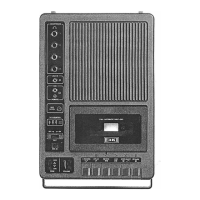
Recording with
manual
level control
(3279
only)
There
are
times
when
it is desirable to
record with
manual level control.
Music for example, usually can
be
recorded with better results in the
manual
method; the
same
is true when
you
are
recording with a relatively high
level
of background noise. This unit
is
sensitive to background noise in the
ALC
mode
and
will tend to emphasize
background sounds in noisy rooms.
To record with
manual
level
control,
follow
these
steps:
1.
Load
unit with a blank tape cassette
with
"knock-out" tabs intact.
2.
Set
the
ALC switch to "off" position.
3.
Use
the built-in Condenser Micro-
phone,
Remote
Control Microphone, or
Auxiliary input.
4.
Press
Pause
key
down, then both
Record
and
Play
keys.
Turn switch on
remote microphone to
"on".
5.
Start the voice or source to
be
re-
corded.
Sounds will
be
picked up by
the microphone, but
because
the
Pause
key is down, they will not
be
recorded.
To set the
level
correctly, watch the
Record
Level
Indicator Light
and
set
the Volume
Control
so
that the
red
light
flickers.
When
the light
is
riot on,
volume
is
set too low.
When
the light
is
on
continuously, volume
is
set too
high.
6.
When
the
level
is
right, press the
Pause
key to
release
it. Tape transport
will start instantly.
8
Using
your
player/recorder
(continued)
To record from sound sources such
as
a radio, tape player
or
other device
through the
AUX input jack, obtain a
suitable connecting cord to hook-up
the source with the
AUX
jack. If using
the
ALC recording system, turn the
sound source to a
normal listening
level. Follow
regular recording proce-
dures. If using the manual recording
system,
follow the procedure
as
when
using a microphone.


 To Next Page
 Loading...