HOW TO CONNECT BLUETOOTH
Step-4: M Mode
Press M button
• In this Mode speed level will be at 20, 50 and 110 and workout time
will be 15 minutes.
Note: In auto mode you will not be able to change time or speed.
To change time or speed you need to stop the machine.
• In manual mode only speed can be change while machine is running.
• To change time, first stop the machine using start button then set time and
then press start button again.
• For stopping machine any time press stop button.
• Max timing that can set is 15 minutes.
• Speed Level 1-120.
1. Each program has 15 minutes of cycle.
2. Number in each rows show speed level of machine at above mentioned minute.
• Go to “Bluetooth settings of your device.
• Connect to ZZ10
• Play any music of your choice
• Volume can be control from connected device only
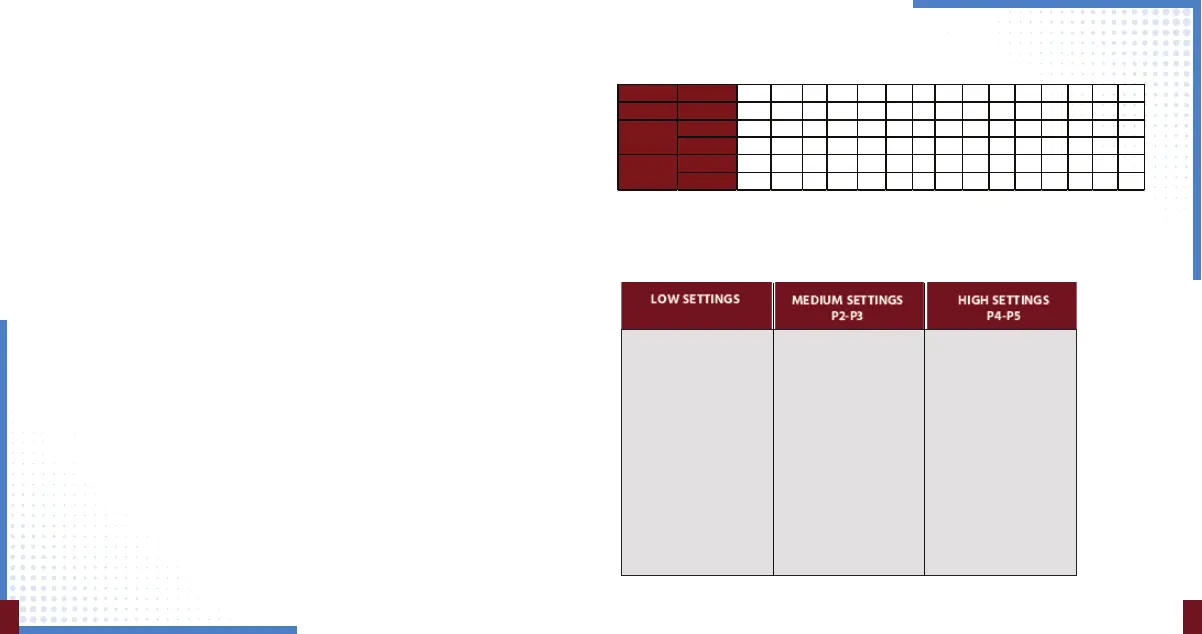
Below chart shows how speed varies in each program modes after each
minute
Great for starting out.
• Detoxification
• Increased bone
density
• Improved balance
• Lymphatic drainage
• Improved postural
control
Great for increased
intensity.
• Fat loss
• Muscle growth
• Highly increased
bone density
• Power accumulation
• HGH release
Perfect for people
with arthritis and
fibromyalgia
• Joint maintenance
• Improved postural
control
• Fat loss
• Increased bone density
• Improved postural
control
• Improve balance
• Cellulite removal
P1
109
Speed Program 15 14 13 12 11 10 9 8 7 6 5 4 3 2 1
Lo w 1 2 4 6 8 10 13 15 12 9 8 8 10 13 15 12
2 8 14 8 14 8 20 8 14 8 14 14 8 20 8 14
3 12 23 29 38 49 6 68 76 48 29 38 49 56 68 76
4 9 13 16 21 24 35 67 50 38 30 21 24 35 67 50
5 23 55 23 55 23 55 23 55 23 55 55 23 35 23 55
Medium
High


 To Next Page