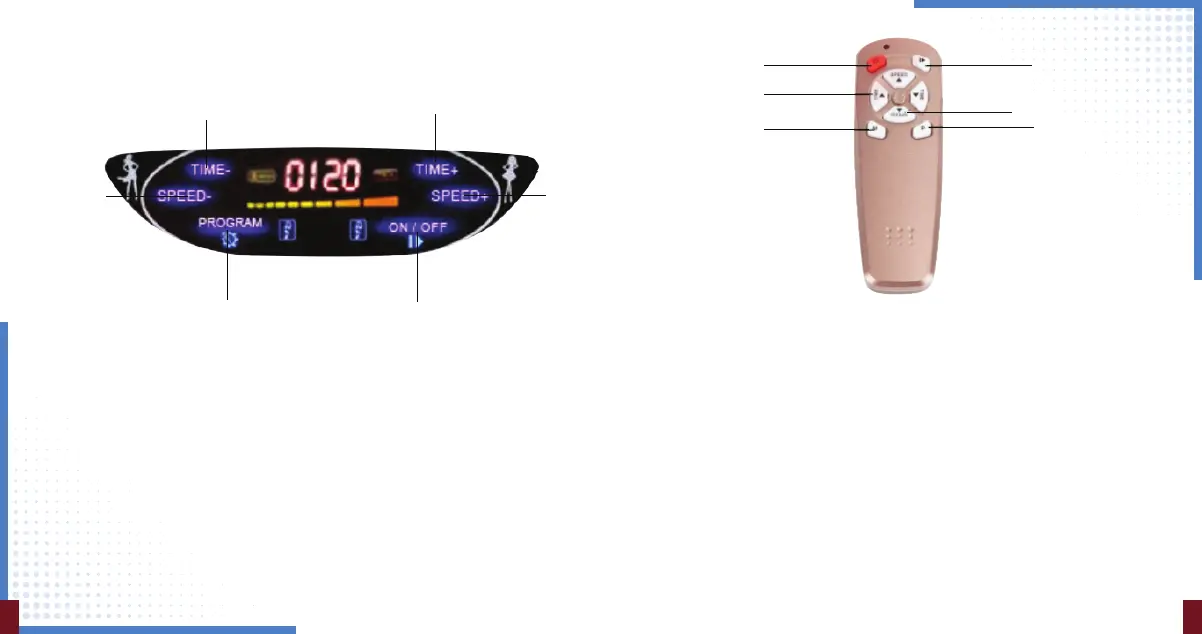
Program Button
(P1, P2, P3, P4, P5)
UNDERSTANDING DISPLAY
REMOTE FUNCTIONALITY
Step-1: Press power button to turn On or O your machine.
Step-2: Manual Mode
• Use time and speed button to use time duration and speed for your
manual workout.
• Now press start button
• While machine running you will able to increase/decrease speed not time.
Step-3: Auto Mode
• Press P button to toggle between 5 auto modes.
• To start machine vibrating press start button after pressing P button.
• In auto mode you will not be able to change timer and speed.
Power Button Start/Pause
Adjust Speed
Select Auto Program
Adjust Time Duration
Select Level
87
Power On/O
Button
Speed
Decrease
Button
Time Decrease Button
Time Increase Button
Speed
Increase
Button


 To Next Page