CC-1194ENG-01
17
8. How do I link with BT device?
9. Can I connect my Bluetooth device to several iSelect kits at the same time?
.
10. Can I assign an address to each kit to identify them with the different zones in my installation?
11. What does the symbol mean?
12. Why does my iSelect Bluetooth® automatically switch on at random?
13. How do I store the radio stations in the memory?
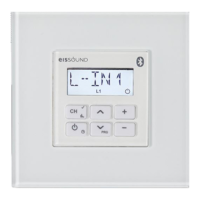
Press the BT key and BT will appear in the screen of the Remote Control. Then press the 5 key for 6” until linking commences. (See User manual
page 11 Section 5.2).
Yes, you can. Before linking the KBSOUND iSelect Bluetooth® kit to your Bluetooth device a numeric address such as KBSound 01, KBSound 02, etc. can
be assigned to each KBSOUND kit installed (See User manual page 10 Section 5.1).
The Remote Control unit exchanges information (transmits and receives data) by means of the IR receiver capsule in the loudspeaker grille. If at any time
there is a failure in the communication, the screen will display the symbol. In the event of this occurring, point the Remote Control at the IR receiver
capsule at a distance of no greater than 5 meter and reconnect.
Sometimes this can occur if you inadvertently press the on /off key for more than 2” and thereby activate the Turn-on mode (Auto ). To turn off
press the on/off key for 2”and check that “Auto X” appears on the screen of the Remote Control (See User manual page 14).
Press the 6 key for 6”. When the automatic storing begins the screen in the Remote Control will display “Auto”. The kit is programed to memorize 30
presets.
No, you can only connect with one kit any one point in time
√
iPOD



 To Next Page