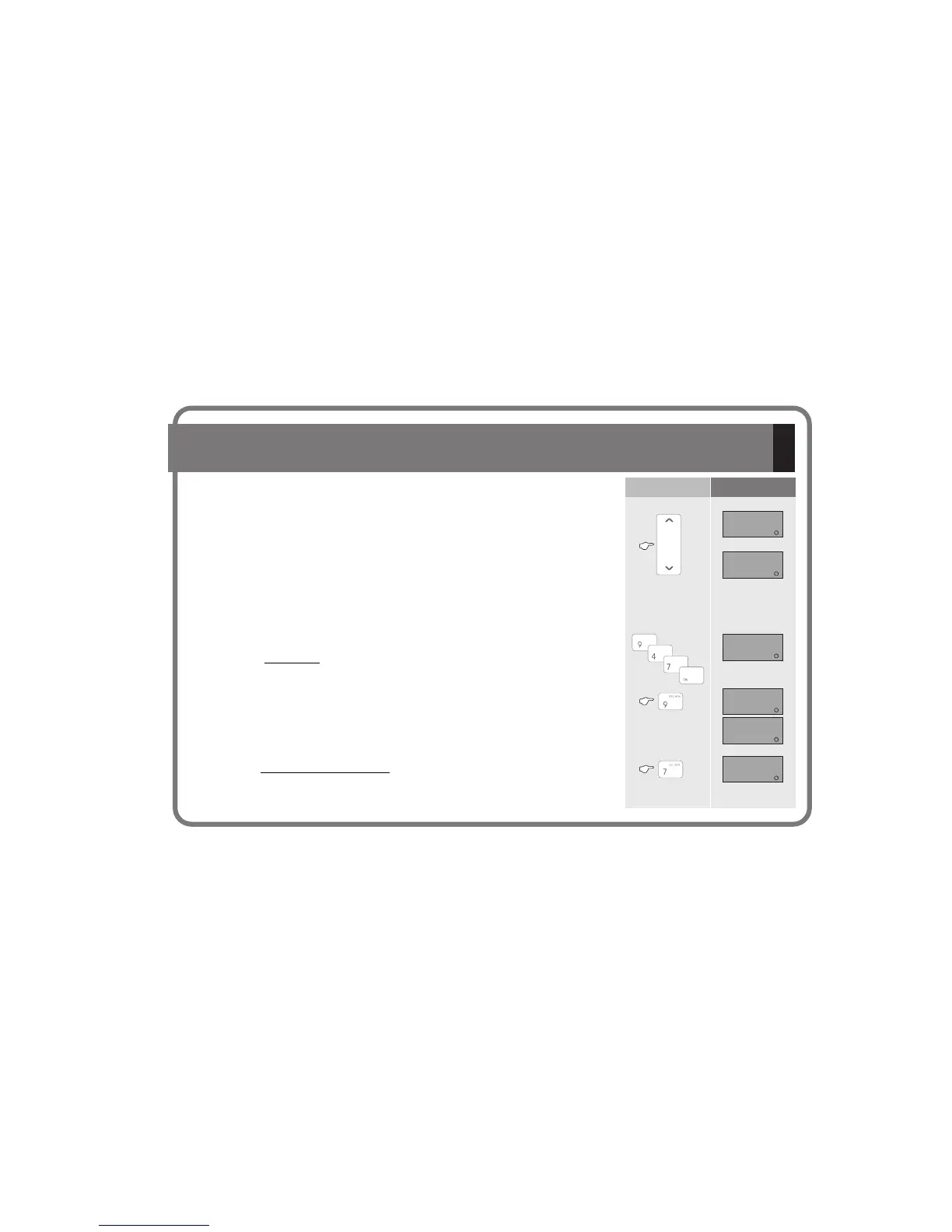
Key Sequence Display
4.4 Storing and Clearing Station Frequencies Manually
To , tune to the station (see Chapter 4.1. Station scan and 4.2. Direct key-in of
Station Frequency).
Hold down the 9 key for 2 seconds.
The station tuned at that time will be stored in the memory.
store a station
To , select the station and hold down the 7 key for 2 seconds.
The station will be deleted from the memory.
delete a station from the memory
The UP/DOWN keys allow you to scroll through the stations stored in the memory (see
Chapter 4.4 and 4.5, Storing and Clearing Stations in Memory).
When stations are stored in the memory they are sorted in ascending order; that is, beginning
with 87.5 and ending with 108.0.
The screen will display the frequency of the station stored in that memory pre-set.
4.3 Tuning to FM Memory Pre-Sets
MEM 07
DEL MEM
MEM 19
102.50
FM
94.70
FM
94.70
FM
2’’
2’’
8
CC-1194ENG-01



 To Next Page