EasyManua.ls Logo

EJEAS EUC - Page 5

EJEAS EUC
124 pages
Print Icon
To Next Page IconTo Next Page
To Previous Page IconTo Previous Page
Loading...
4
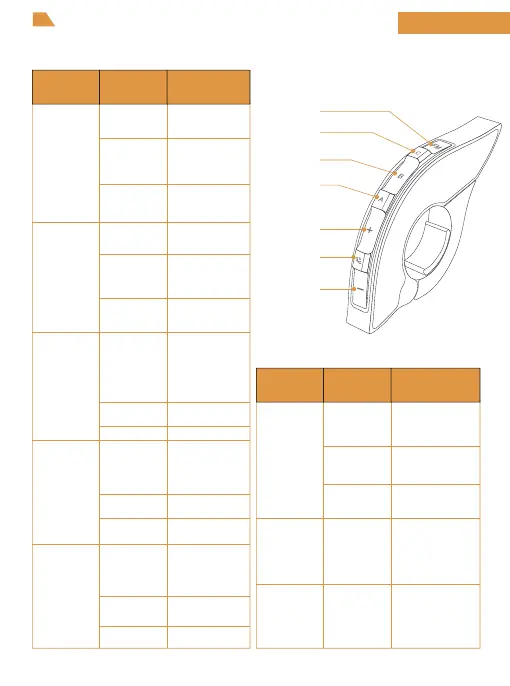
B Button
A Button
Volume +
Volume -
Phone Button
B Button
EUC Remote Controller (Optional)
Buttons Introduction
Buttons
FM Button
C Button
Buttons
Actions
Function
Volume +
Short press
(Music Alone
or FM Alone)
Short press
Short press
Short press
Long press
Long press
Long press
Long press
Long press
Double click
(Simultaneous Music
and Intercom)
Short press
(Music Alone
or FM Alone)
Double click
(Simultaneous Music
and Intercom)
Double click
Double click
Double click
Short press
Short press
Initiate Bluetooth
Intercom Connection
Long press
Double click
Super
Long Press
C Button
FM Button
Volume -
+
FM Button
Volume -
Phone Button
A Button
Actions Function
Turn off
Mesh Intercom
Switch VOX sensitivity
during Mesh intercom
Music sharing start/end
None
None
None
Disconnect the
intercom
Turn FM on/off
Clear handle
pairing records
Last number redial
Reject calls
Voice assistant
01. Answer a call
when it comes in
02. On call, hang up
03. Music play/pause
04. When no mobile
phone is connected
Connect the last
connected phone
01. Turn on
mesh intercom
02. Mute/unmute
microphone when
mesh is connected
Previous song when
music is playing.
Decrease the frequency
when FM is on
Next song when
music is playing.
Increase the frequency
when FM is on
Intercom Volume +/
Music Volume +/
FM Volume +
Intercom Volume +/
Music Volume +/
FM Volume +
Intercom Volume -/
Music Volume -/
FM Volume -
Intercom Volume -/
Music Volume -/
FM Volume -
Q8-English

Other manuals for EJEAS EUC

Related product manuals