ESK-2-UG-Rev1-EN /08.06.2022
Ekahau Sidekick 2
Ekahau Sidekick 2 is a purpose-built site survey device meant for walk-tesng
of the wireless networks in order to design, validate, opmize or troubleshoot
the Wi-Fi / WLAN / 802.11 networks. The device is intended for receiving and
measuring the RF spectrum on 2.4 GHz, 5 GHz and 6 GHz bands as well as spe-
cically analyzing the signals from Wi-Fi access points. It is planned to be used
together with other Ekahau provided Wi-Fi tools and applicaons by connecng
the device via USB cable to computers and tablets.
CAUTION
▪ It is not permitted to use the device for anything else than what it is originally
intended for.
▪ Do not immerse the device or the power supply under the water, even
partially. There is a risk of injury or death if not followed.
▪ Do not try opening or tampering the device mechanically. There is a risk of
injury or death if not followed. Warranty will be void if attempted.
▪ Do not try replacing the battery by yourself. It is not meant to be serviced
by the user. There is a risk of injury or death if not followed. Instead contact
Ekahau support for more information.
▪ Do not expose the device to the excess moisture, fluids or liquids, heat,
fire, smoke or corrosive substances. There is a risk of injury or death if not
followed.
▪ Do not use or store the product in a high-temperature location, such as inside
a car under the hot sun. There is a risk of battery leakage or explosion, and
thus injury or death, if not followed.
▪ Use only the power supply provided by Ekahau. Never exceed the maximum
allowed input rating of the power supply.
▪ Do not use the device as covered, or upside down for long periods, or when in
enclosed space, e.g. pocket or bag.
▪ Do not drop or break the device by hitting hard objects. Do not let children or
pets play with the device.
Geng started
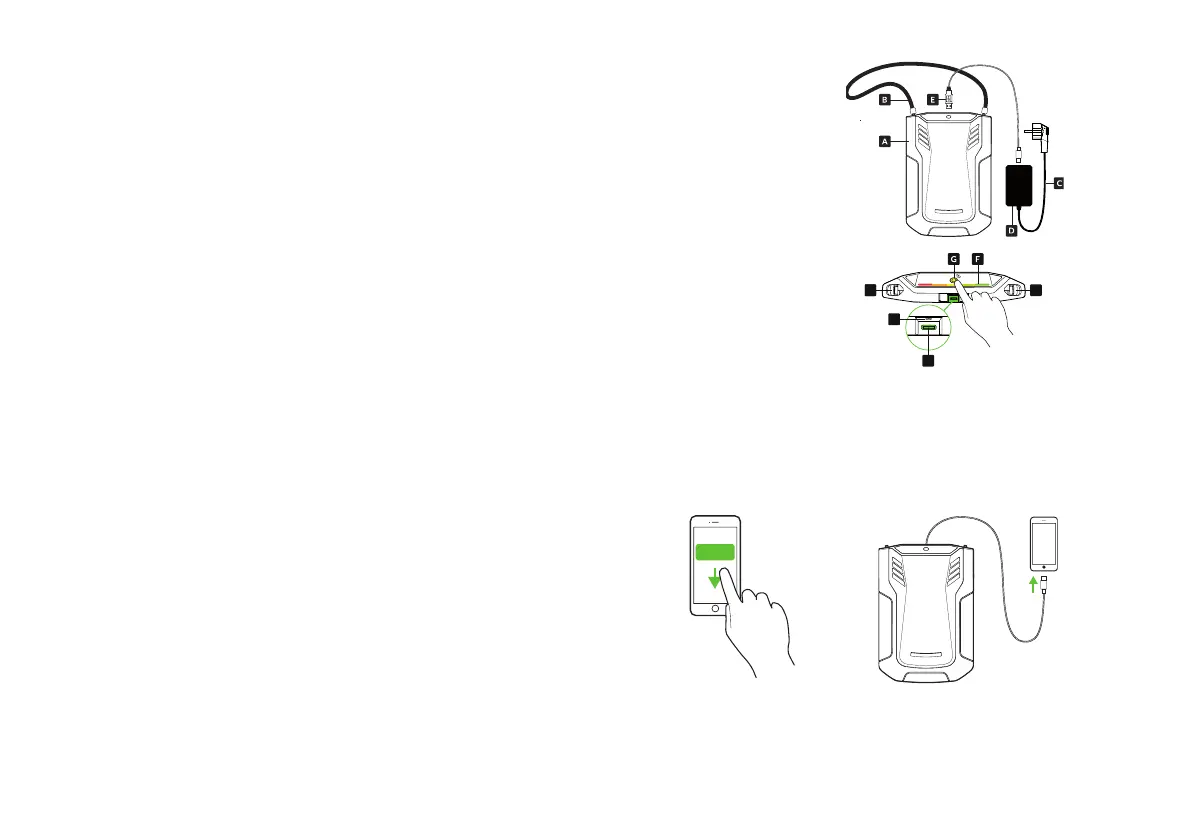
Content of the package
A. Sidekick unit
B. Carrying strap
C. Wall socket cable
D. Power supply
E. USB-C cable
Sidekick unit
F. Status indicator
G. Power buon
H. USB-C connector
I. Carrying strap holders
J. Reset buon
How to start
1. Fix the carrying strap to the device.
2. Wear the device. Adjust the carrying strap to a length suitable for you.
3. Connect the USB cable to the device if not connected. Exercise cauon
when connecng. Do not use excessive force.
4. Connect the other end of the USB cable to the laptop, tablet or phone.
5. Switch on the Sidekick 2 unit by pressing the power buon. The indicator
will start pulsang yellow indicang that the device is starng up.
6. Start your Ekahau applicaon the laptop, tablet or phone. Find more
informaon on how to use compable applicaons at hp://docs.ekahau.com
J
H
II I
Download


 To Next Page