14
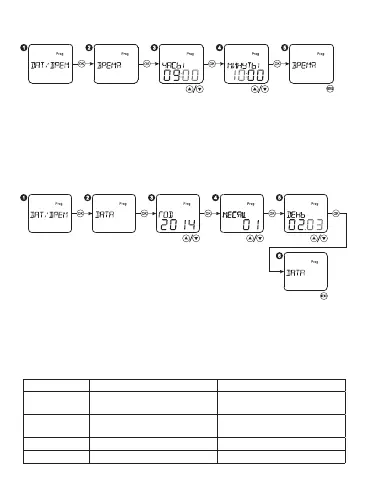
Select the menu item DATE/TIME, press the button OK. Then select the
menu item TIME, press OK. Set up the current hour and minute with the
buttons with «▲▼» , moving to the relative item with the button OK.
If you press the buttons «▲▼» for a long time (more than 0,5 s), the
values will be changed quicker. Press MENU to exit from the settings.
Current date setting:
Current time setting:
Select the menu item DATE/TIME, press the button OK. Then select the
menu item TIME, press OK. Set up the current year, month, day with
the buttons «▲▼», moving to the relative item with the button OK. If
you press the buttons «▲▼» for a long time (more than 0,5 s), the
values will be changed quicker. Press MENU to exit from the settings.
Display Summer time Winter time
Summer time
EUROPE
Last Sunday in March Last Sunday in October
Summer time
USA
Second Sunday in March First Sunday in November
PROGRAMMS Free programming Free programming
OFF No No


 To Next Page