17
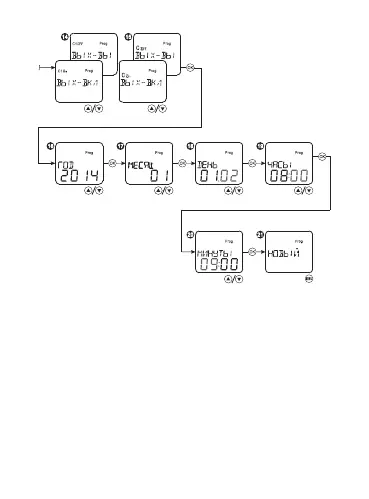
Select the menu item PROGRAM, press the button OK. Select the item
NEW, press the button OK. After that the number of the program will
be displayed. If the memory of the timer is full, a new program will
not be congured. FULL will be displayed. Set up the weekly WEEK
or yearly YEARLY operation cycle of the timer. Then set the position of
output contacts. Then select the night mode NIGHT (the relay will be
activated only when the ON/OFF time is between sunset and sunrise
with regard to offsets) or ALWAYS. Then set hours and minutes for a
weekly cycle; year, month, day and time for a yearly cycle to activate
the program for each channel. Press the button OK. If required, add
an additional program step, press OK and repeat programming. Press
MENU to complete programming.


 To Next Page