22
Working hour counter:
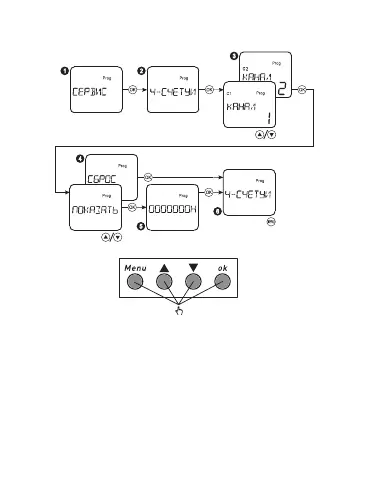
Select menu item SERVICE, press the button OK. Select the item HOUR
COUNTER, press the button OK. Select the channel, then select the
item SHOW to review the number of working hours in the ON position.
Select the item RESET to delete the working time. Press MENU to exit.
Select the menu item SERVICE, press the button OK. Select the item
BACKLIT, press the button OK. Select the item ON to illuminate the
screen permanently or 2 MIN - backlit goes off after 2 minutes from the
moment when the buttons were pressed last time. Press MENU to exit.
Только для
реле с 2 C/O


 To Next Page