14
1 2 3
7
8
9
10
4
5
MENU
MENU
OK OK OK
OK
OK
OK
OK
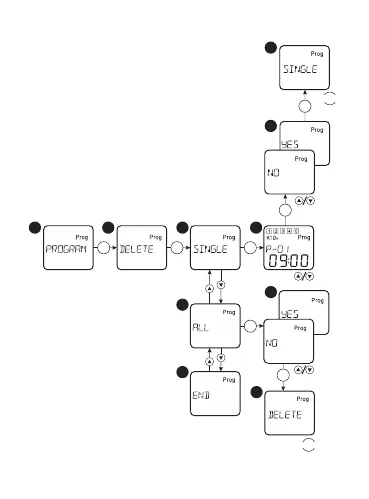
Delete the program:
Select in the main menu the option
«PROGRAM», conrm the selection with the
button «OK». Select the option «DELETE»,
conrm the selection with the button «OK».
If necessary to delete one program, select
the option «SINGLE», after that by using the
buttons «up/down», select the number of
deleted program and press the button «OK».
If necessary to delete all the programs,
select the option «ALL» and conrm the
memory cleaning of the timer with the
button «OK».


 To Next Page