4 of 13
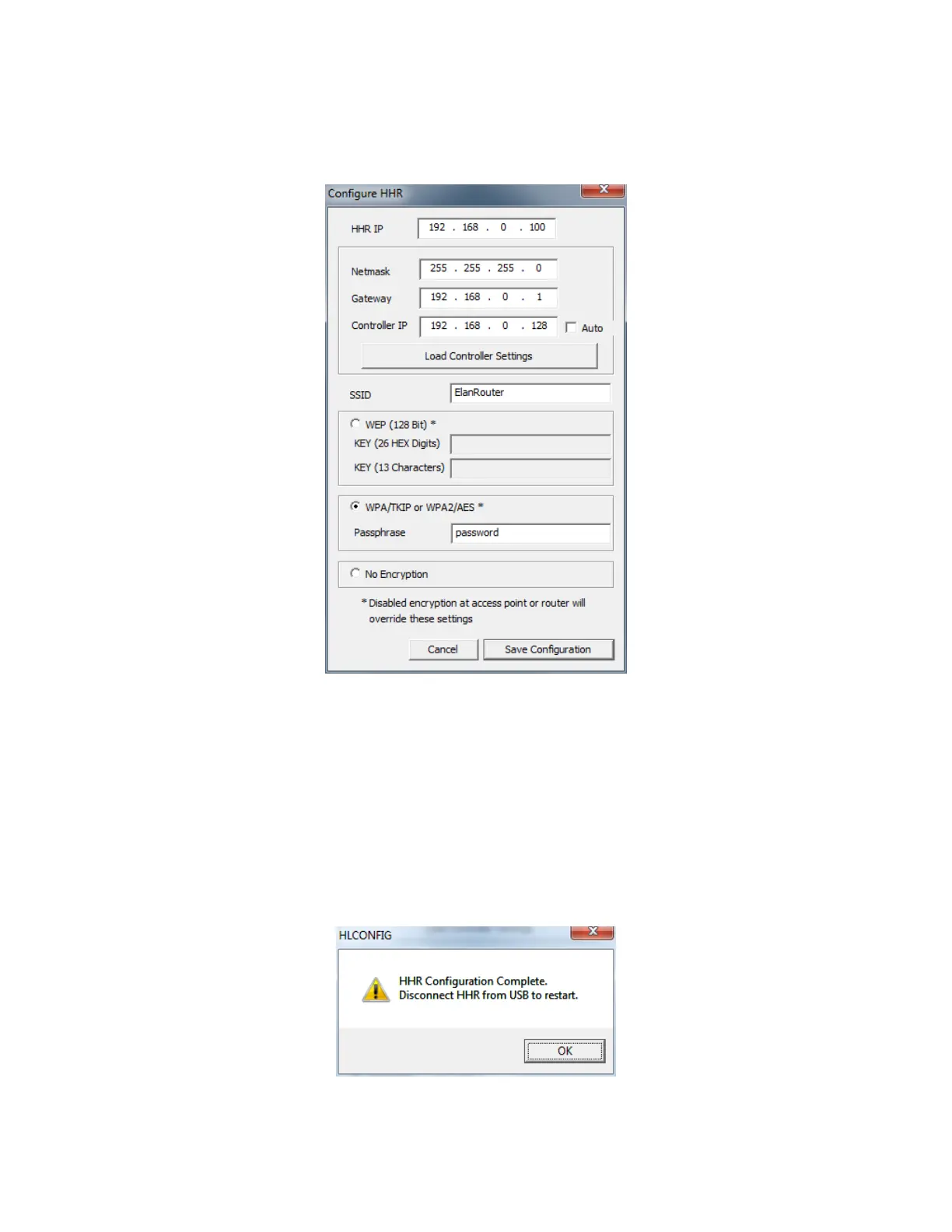
10. In the Configurator, Right-click on the HHR communication device added in step 4 above and select
“Configure Attached HHR” from the menu. This will bring up the Configure HHR dialog box as shown
below.
11. Click the Load Controller Settings to automatically set the net mask, Gateway address, and Controller
IP address. This will also set the HHR IP address to a default value based on the Gateway address
loaded from the Controller. (Note: Your ELAN Home Controller must be assigned a static IP for this
function)
12. Enter your predetermined static IP address for the HHR in the HHR IP field. Note the static IP must
be outside of the network DHCP range, and not currently in use by another device. If you do not
know this address you will need to get it from your network administrator.
13. Enter the SSID for the wireless access point that the HHR will be connecting to.
14. Select the encryption type and enter the wireless password in the appropriate field.
15. Click Save Configuration to write the information down to the remote. Once complete you will get the
notification below that it is safe to disconnect the USB.
16. Click OK to close the dialog box
17. Switch the remote power switch to ON, remove the USB cable and replace the remote endcap.


 To Next Page
 Loading...