
 Need help?
Do you have a question about the ELAUT Intelligrab 02 Series and is the answer not in the manual?
Key principles for successful crane operation, focusing on player engagement and profit margins.
Describes the step-by-step process a player follows when playing the crane game.
Analyzing payout percentages and grab success rates to optimize machine performance and profitability.
Details on monitoring cashboxes, managing accounts, and understanding mechanical counters for financial oversight.
Instructions for safely cleaning the machine and guidelines for filling the crane with merchandise.
Explanation of the Intelli Programmer's buttons and display symbols for navigating menus and activating functions.
Details on identifying the machine program and configuring Intelli Link network addresses and remote language settings.
How to use accounts for long-term results, manage payments, and enable security features for accounting data.
Functions for manual game control, and detailed parameters for adjusting claw power, retaining power, and pickup time.
Setting up credit values, game prices, bonus levels, and defining values for accepted coins and bills.
Configuring game time, movement controls, nudges, return diagonal, and detector settings for optimal gameplay.
Adjusting motor speeds, dispenser types, attract mode volume, sound tracks, and default settings.
Guide to interpreting diagnostic codes for system errors and diagnosing mechanical problems using switch states.
Performing self-tests for claw type, mechanical cycles, lamps, dispenser, and controls, including cord replacement.
Step-by-step guide to adjusting pickup power, retaining power, and pickup time for balanced gameplay and desired win rates.
Explanation of display codes for various warnings and errors, such as door open, meter overflow, and parameter changes.
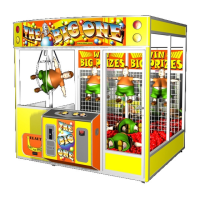
Overview of specific game settings, motor speeds, diagnostics, and error handling pertinent to 'The Big One' model.
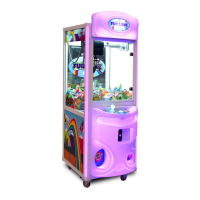
This document serves as a comprehensive manual for the Intelli Technology crane, specifically covering the Intelligrab 02xx revxx and The Big One 03xx revxx models. It provides detailed instructions on operation, settings, maintenance, and troubleshooting, aiming to help operators maximize the potential of their crane system.
The core function of the Intelli Technology crane is to provide an interactive game experience where players attempt to grab merchandise. The system is designed with two essential qualities: powerful grabbers with adjustable strength and a payment regulator that ensures a desired payout percentage. The crane's operation is electronically controlled, but the manager plays a crucial role in adjusting settings to balance player experience and profitability.
The Intelli Technology crane operates on a credit-based system. Players insert money to gain credits, which allow them to control the gantry using buttons or a joystick. The gantry moves above the playfield, and when the player releases the button or presses the fire button, the grabber descends to pick up an object with a pre-set power. A win is registered when the merchandise successfully falls into the prize hole.
Key aspects of the game are highly customizable through the Intelli Programmer, a dedicated interface with an LCD display and pushbuttons. This programmer allows access to various menus and settings, providing information about the system's functioning and enabling adjustments. The system's intelligence lies in its ability to regulate payout percentages, ensuring that the machine operates within desired profitability margins while still offering an engaging experience.
The "Intelligrab" menu provides identification of the program, including machine type, version, revision number, and date, which is crucial for technical support. The "Intelli link" menu allows each playfield in an Intelli network to have a unique address and supports remote language settings, enabling the PC to communicate with the controller in different languages.
The "Accounts" section is vital for long-term financial evaluation. It tracks total merchandise won ("total out"), total receipts ("total in"), payout percentage, number of prizes won ("#tot. wins"), and the number of prizes refilled ("#tot. refill"). These counters help managers assess profitability over specific periods and settle payments with operators. An "acc security" option can be activated to restrict access to accounting data, requiring the Intelli Link for viewing or erasing.
"Cashboxes" function as short-term counters, tracking "coins in," "bill/tk in," "#wins," and "#dispenser" (consolation prizes). These meters help verify the emptying of physical cashboxes. The "toys alarm" and "dispenser alarm" features trigger alerts if the number of won prizes or consolation prizes exceeds a set limit, respectively. The "toys refill" function allows operators to input the number of prizes added during refilling, aiding stock management through Intelli Link.
"Manual control" offers several functions for direct intervention: "assign win" to manually register a win if the machine fails to detect it, "1 free game" for a free game with retaining power, "game with bonus" for a free game with pick-up power, "bonus till win" to activate pick-up power until the next win, "stand-by" to put the playfield in a paused state, and "free game mode" for playing without inserting money, without affecting counters.
"Claw-settings" are central to game difficulty and payout. "Pick up power" and "retaining power" define the strength of the grabber during the initial pick-up and after a set time, respectively. The "indicator" shows the current grabber power. "Pick up time" determines how long the pick-up power lasts before transitioning to retaining power. "Random pick up" introduces variability to the pick-up time. "Casual win" adjusts the frequency of prizes won with reduced grab power. "Test normal game" and "test pick up game" allow for free-credit testing of game mechanics without affecting counters.
"Payout information" provides real-time data on the "current perc" (actual payout percentage), "set perc" (desired payout percentage), "est.price out" (vending price of merchandise), "products cost" (purchase price), "grabsucces" (percentage of potential winning games used), and "win xx games ago" (games played since the last win). The "calibrate" function clears the payout regulator and remaining credits, necessary after changing settings.
"Credit values" allow for setting a "fixed value" per game or defining credit amounts per coin/bill channel. "Game price" is the value of a game when "fixed value" is active. "Bonus level" grants an extra credit upon reaching a certain value. "Reference channel" indicates the most used channel for payment. The manual also details how to configure credits per coin/bill for up to seven channels.
"Coin values" and "Bill / token values" allow precise adjustment of the monetary value for each coin and bill acceptor channel, respectively. A "meter divider" sets the value of a pulse to the mechanical counters. The "indicative value" for bills is important for mechanical counters and cashboxes, allowing for direct counting of bills regardless of their monetary value.
"Game settings" include "game time" (maximum playtime), "4 directions" (distinguishes between pushbuttons and joystick), "commande mode" (gantry movement mode), "carriage jump" (gantry starting at a programmed point), "play with nudges" (allows multiple forward movements but only one sidewards), "return diagonal" (gantry returns diagonally), "stop and drop" (adjusts how far the claw descends before opening), "smart detector" (enables/disables prize detector when crane is active), "credit limit" and "money in limit" (disable acceptors when limits are reached).
"Motor speeds" allows separate adjustment of "forward motor," "sideward motor," "up/down" speeds for the gantry. For "The Big One" model, "up" and "down" speeds can be set independently.
"Dispenser settings" manage consolation prizes. "Pay award" memorizes credits for unpaid tickets/chewing gums. "Feed" assists in filling the dispenser. "# pay at win," "# pay at loss," "# pay at start," and "# pay at end" define the number of awards paid at different game stages. "Clear awarded" clears unpaid credits. "Dispenser type" configures the type of dispenser used.
"Attract. settings" control the machine's appeal when idle. "Volume game" and "volume attr" set audio levels during gameplay and attract mode. "Sound track" selects the audio track. "Attr time out" defines the interval for attraction movement. "Attr movement" activates gantry movement during attract mode. "Auxiliary volume" mixes an external sound source.
"Default settings" allow saving and loading custom settings. "#decimals" sets the number of decimal places for money values. "Language" selects the display language. Pre-set default settings for various countries/continents are also available.
The Intelli Programmer is the primary interface for interacting with the crane's settings. Arrows ("up" and "down") navigate menus, "Select" opens/closes menus or performs actions (e.g., clearing counters), "Help" provides information on settings, "Test" activates test functions, and "-" and "+" buttons change values. Icons indicate information-only lines ("i"), test functions ("T"), and general functions ("S").
The manual emphasizes the importance of proper merchandise selection, recommending items of similar form, weight, and price within a playfield to simplify adjustments and ensure precise payouts. It advises adjusting the crane to popular merchandise if a mixture is used.
The adjustment process begins with "retaining power." The merchandise is held in the claw, and the "test" button is pressed. The claw closes, and the power is adjusted until the merchandise just slips out. This is an approximate setting, requiring further fine-tuning during actual gameplay. Next, "pick up power" is set, typically double the retaining power. The merchandise should be easily held by the claw when the "test" button is pressed. "Pick up time" determines the duration of the pick-up power. This setting influences how high the merchandise can be lifted before dropping. The "random pick up" option introduces variability to this time, making each game slightly different.
Access to the maintenance area is secured by a key-locked door. Operators and maintenance personnel use this area for refilling prizes and cleaning. The machine can remain powered during these operations, but caution is advised due to the potentially moving claw.
Cleaning: Only dry or humid cloths should be used for cleaning. Water or wet materials are strictly prohibited to prevent damage or dangerous situations.
Filling the Crane: It's recommended to keep merchandise of the same kind in one playfield. This simplifies adjustments and ensures more precise payouts. If a mixture of merchandise is used, the crane should be adjusted to the most popular items. Settings generally do not need to be changed if comparable merchandise is used for refilling. The manual warns that even small changes in claw set-up can have significant consequences.
Diagnostics and Troubleshooting: The "Diagnostics" menu provides information on various errors, including "last money" inserted, "meter error," "coin/bill" problems, "dispenser error," "pay out errors," and "data errors." These can be cleared using "S clear diagnostics."
The "Mechanical diagnostics" menu helps identify mechanical problems by checking switches. It reports errors such as "last mech err," "#mechanic. err," "home SW warn," "left SW warn," "home failure," "down SW stuck," "down SW open," "down failure," "up SW stuck," "up SW open," "up failure," "string broken," "grabber stuck," and "grabber fail." These can be cleared with "S clear diagnostics."
The "Selftest" menu offers various test functions: "T clawtype" measures the claw type, "T cord replacement" assists in replacing the string (including unwinding and winding), "T mech. cycle" performs a complete mechanical cycle test, "T lamptest" flashes control lamps, "T dispenser" pays out a consolation prize, "i coin-in" controls coin/bill acceptor, "i ctrl" controls push buttons/joystick, "i gantry-in" controls gantry switches, "i extension" controls extensions (e.g., IR-detection), and "i data in" controls Intelli link data. These tests help localize and solve problems.
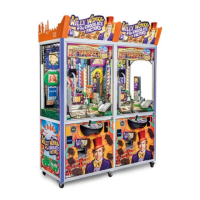
The manual also lists various "Warnings and errors" with corresponding display codes, offering guidance on how to address issues ranging from open doors and incorrect game prices to mechanical failures and power supply fluctuations. For "The Big One" model, additional settings like "win door mode" (manual, half automatic, automatic prize removal) and separate "up" and "down" motor speeds are available. Specific errors related to the win door are also covered.
 General
| Category | Arcade Game Machines |
|---|---|
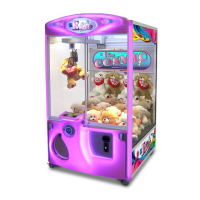
| Type | Claw Machine |
| Series | Intelligrab 02 |
| Manufacturer | ELAUT |
| Weight | 200 kg |
| Operation | Coin Operated |
| Features | LED lighting, adjustable claw strength |


 To Next Page