5-6
ARRIVING ON SITE
Operating the levelsystem
Automatic levelling
Procedure for automatic deployment/extension of the axle and corner supports.
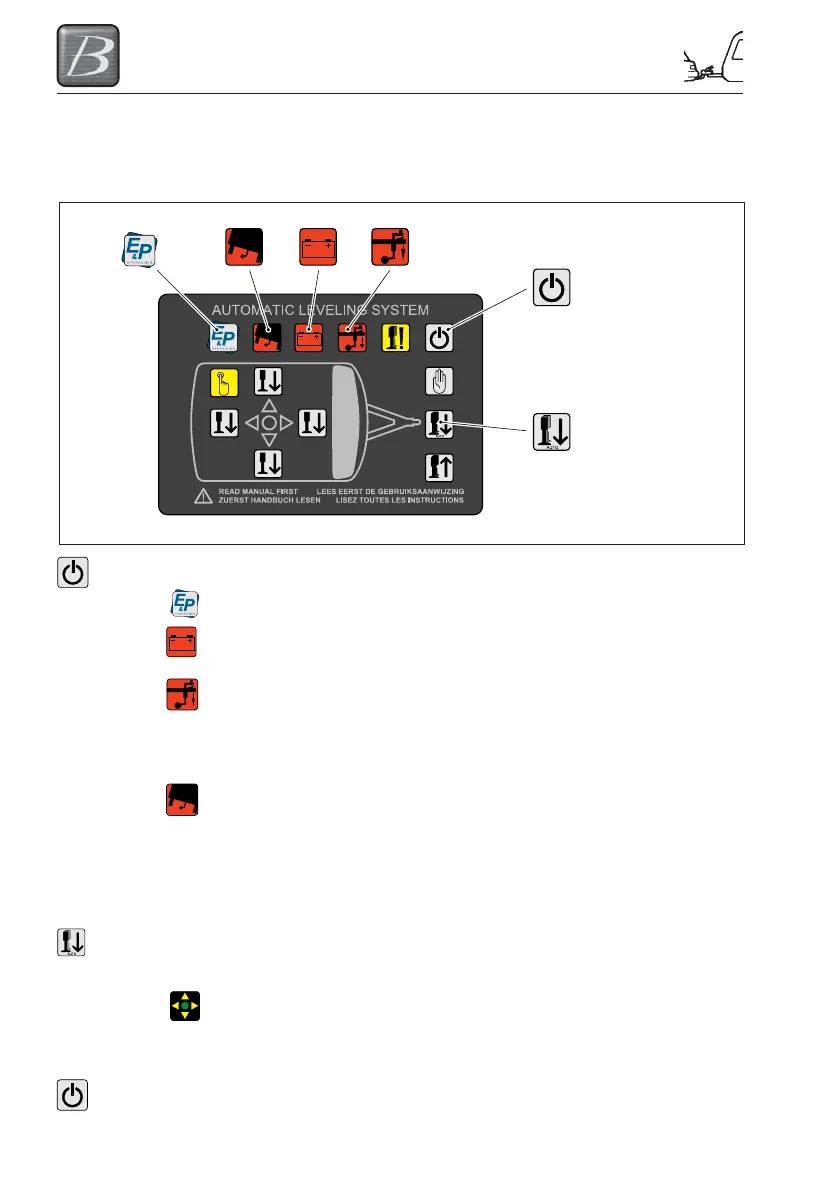
Step 1 Press 1x on the button ON/OFF (no.5) to switch the levelsystem ON.
The E&P-logo LED lights up, indicating that the levelsystem is switched on.
When there is insufficient or no battery voltage, the indicator LED “LOW
VOLTAGE” (no.2) lights up.
In automatic levelling, the caravan must be tilted a few degrees forwards.
The system will indicate whether you have positioned the caravan level
enough. If you have not, the indicator LED “FRONT WHEEL” (no.3) lights
up and the system cannot be started automatically. The front wheel must be
wound down.
When the caravan leans too steeply, the indicator LED “SLOPE TOO
STEEP” (no.1) lights up.
REMARK: When the caravan stands too skewed, the caravan cannot be
automatically levelled. You now have two options: Stop the levelling
procedure and place the caravan on a flatter surface and start again with
automatic levelling procedure. Or go further with manual levelling
procedure.
Step 2 Press 1x on the button “AUTOMATIC MODE” (no.7) to start the automatic
levelling procedure.
When the levelling procedure is complete, the indicator LED “LEVEL”
(no.14) lights up GREEN.
REMARK: Depending on the angle of the terrain and type of caravan, the
automatic levelling procedure takes about 1 minute.
Step 3 Press 1x on the button “ON/OFF” (no.5) to switch the levelsystem OFF.
1
2
3
ON/OFF
(no.5)
AUTOMATIC
MODE
(no.7)
AUTO




 To Next Page