6 EN
ELDES WIRELESS TOUCHPAD EWKB5
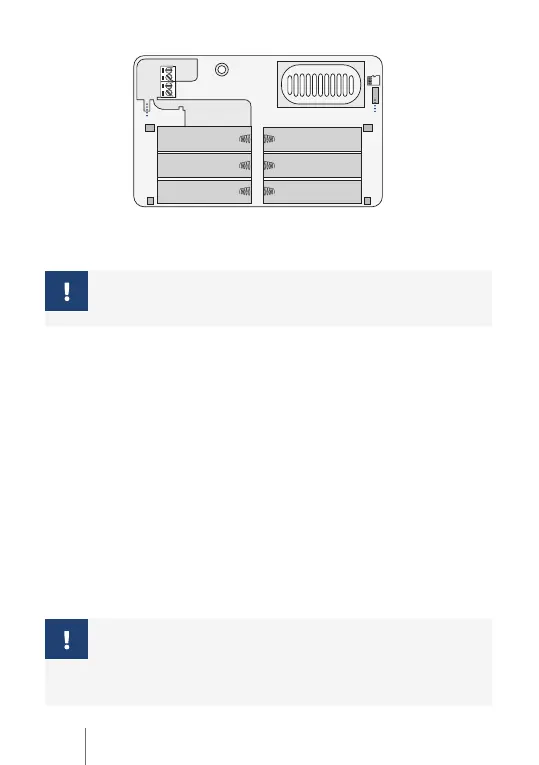
COM
AUX-
AUX+
RESET
SPEAKER
TAMPER
SD
TAMPER
Z1
+
+
+
+
+
+
-
-
-
-
-
-
2 . CONFIGURING AND PAIRING WITH THE SYSTEM
For more details on how to conigure and pair the device with the system, please visit
eldesalarms.com to get the latest alarm system’s installaion/user manual.
If you are unable to pair the wireless device, please restore the parameters of
the wireless device to default and try again (see 5. RESTORING DEFAULT
PARAMETERS & UPDATING FIRMWARE for more details.)
3. EWKB5 ZONES AND TAMPERS
Upon successful EWKB5 connecion process, the alarm system adds 1 Instant-type wireless
zone, 1 Fire-type virtual zone and 1 Panic/Silent-type virtual zone. The wireless zone can
be used for passive wired sensor connecion, such as magneic door contact intended to
be installed at the designated entry/exit doors. The virtual zones represent the main menu
butons.
In case of tamper violaion, the alarm is caused regardless of the system being armed or
disarmed. There are 2 ways to determine tamper violaion on EWKB5:
• By tamper switch. EWKB5 comes equipped with 2 built-in tamper switches intended for
enclosure supervision:
• one located on the front side of the PCB supervising the front cover in case it is illegally
opened.
• the other one located on back of the PCB supervising the back side of the enclosure in
case the EWKB5 is illegally detached from the wall.
• By wireless connecion loss. The wireless connecion loss between EWKB5 and ELDES
alarm system leads to alarm. The system ideniies this event as a tamper violaion and
sends alarm by SMS text message and phone call to the user, by default. The SMS text
message contains the wireless device model, wireless ID code and tamper name. The user
will also be noiied by SMS text message as soon as the wireless signal is restored.
It is mandatory to connect the resistor of 5,6kΩ nominal included in the
product pack, otherwise the zone state will remain in permanent alarm
condiion. If you don’t wish to connect the resistor and don’t intend to use
the zone, please disable the zone using ELDES coniguraion sotware or
any other coniguraion method supported by ELDES alarm system.


 To Next Page