8 EN
ELDES WIRELESS TOUCHPAD EWKB5
5. RESTORING DEFAULT PARAMETERS & UPDATING FIRMWARE
In order to restore default parameters, EWKB5 must be powered on either by the main
power supply or by batery power.
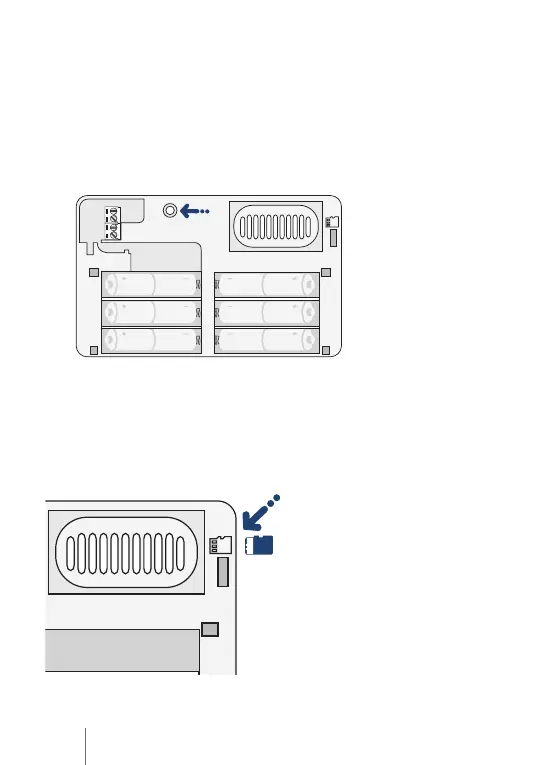
RESTORING DEFAULT PARAMETERS
1. Press and hold the RESET buton for 10 sec.
2. Watch the red indicator lash several imes.
3. Release the RESET buton.
4. Parameters restored to default values.
+
+
+
+
+
+
-
-
-
-
-
-
UPDATING FIRMWARE
1. Power up EWKB5.
2. Transfer the irmware .bin ile from your computer to the microSD card, while
creaing a new folder “irmware” beforehand (the ulimate ile path should be: SD
--> Firmware--> .bin ile).
3. Insert the microSD card into the card slot of EWKB5.
4. Watch the on-screen progress and wait unil it is complete.
5. Firmware updated.
+


 To Next Page