EasyManua.ls Logo

Eleaf iStick 30W - User Manual

Eleaf iStick 30W
2 pages
Print Icon
To Next Page IconTo Next Page
Loading...
Notice for Use
Thank you for choosing Eleaf products! Please read this manual carefully before use so
as to use correctly. If you require additional information or have questions about the
product or its use, please consult your local agents, or visit our website at
www.eleafworld.com.
Product Introduction
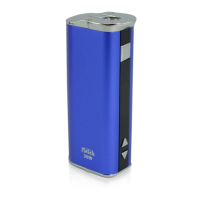
iStick 30W is an upgraded version compared with the original iStick. It is more
powerful: with 2200mAh battery capacity, it can handle up to 8V, 30W and support
sub ohm coil. It is more practical: wear-resistant stainless steel thread, elastic
connector and streamlined design on top make iStick 30W more suitable for
atomizers. More ever, the added button lock functionality protects the button from
unintentional presses. iStick 30W is the one you deserve to own.
How to use
Press the square button for five times to turn on the battery, and then long press the
square button to get a puff. Loosen the square button to stop puff.
Switch the VV/VW mode: Press the square button for three times to switch the VV/VW
mode when the battery is turned on. In VV mode, you can adjust output voltage between
2.0V-8.0V. In VW mode, you can adjust output wattage between 5W-30W.
Adjust the voltage/wattage: Press the up-and-down arrow buttons to increase or
decrease the voltage/wattage. Keep pressing the up/down arrow button, voltage/wattage
will increase or decrease slowly at first, then they will increase/decrease at a constant
high speed. The number will stop increasing/decreasing when you loosen the up/down
arrow button.
Button lock functionality: Keep pressing up-arrow button and down-arrow button
simultaneously for 2 seconds when the battery is on, then they will be locked and the
screen will reflect “Lock”. Still keep pressing simultaneously for 2 seconds to unlock them
and the screen will reflect “Unlock”.Through these operations, you can protect the buttons
from unintentional presses and prolong their service life.
Switch the display mode: Keep pressing up-arrow button and down-arrow button
simultaneously for 2 seconds when the battery is off, the screen display will rotate 180
degrees. You can view the screen from two kinds of angle through this operation.
iStick 30W
User Manual
How to charge
iStick 30 W is charged through USB port at the bottom of battery. It will take 2.5 hours to
fully charge the battery via 1A wall adaptor.
the square button
the OLED screen
down arrow button
up arrow button
The battery level indicator on the OLED screen will keep flashing during charging. When
fully charged, the indicator will stop flashing and keep shining for 15 seconds then go out.
Question and Answer IconNeed help?

Do you have a question about the Eleaf iStick 30W and is the answer not in the manual?

Summary

Notice for Use

Product Introduction

How to Use

Power On, Off, and Puffing

Turn the battery on/off by pressing the square button five times. Puff by long pressing the button.

Switching VV;VW Modes

Switch between VV and VW modes by pressing the square button thrice. Adjust voltage (2-8V) or wattage (5-30W).

Adjusting Voltage;Wattage

Use up/down arrow buttons to adjust voltage/wattage. Holding them increases speed after initial slow adjustment.

Button Lock Functionality

Lock/unlock buttons by pressing up/down arrows simultaneously for 2s. Screen shows 'Lock' or 'Unlock'.

Display Mode Rotation

Rotate screen display 180 degrees by pressing up/down arrows simultaneously for 2s when the battery is off.

Charging the Battery

Charge via USB port at the bottom. Full charge takes 2.5 hours with a 1A adapter.

Device Properties and Protections

Charging Indicator

Battery level flashes during charging; stops flashing when fully charged.

Over 10 s Protection

Output shuts off if button is pressed for over 10s; screen shows 'Over 10s'.

Atomizer Short-circuit Protection

Screen displays 'Atomizer Short' if the atomizer has a short circuit.

Low-voltage Protection

Screen displays 'Lock' when battery voltage drops below 3.3V.

Low Power Alert

Power symbol flashes when battery level is below 10%.

Device Markings

Identifies laser markers on the battery end and bottom for branding and certification.

Precautions and Warranty

Safety Precautions

Advices against self-repair, extreme temperatures, and combining with other brands.

Warranty Information

States warranty is void for human error or third-party purchases.

Eleaf iStick 30W Specifications

General IconGeneral
Battery Capacity2200mAh
Wattage Range5W - 30W
Voltage Range2V - 8V
Resistance Range0.4Ω - 5Ω
Charging Current1A
Connector Type510
Dimensions23.0mm x 32.5mm x 77.0mm

Related product manuals