EasyManua.ls Logo

Elechomes UC5501W - AP Mode Connection

Elechomes UC5501W
24 pages
Print Icon
To Next Page IconTo Next Page
To Previous Page IconTo Previous Page
Loading...
14
AP Mode Connection
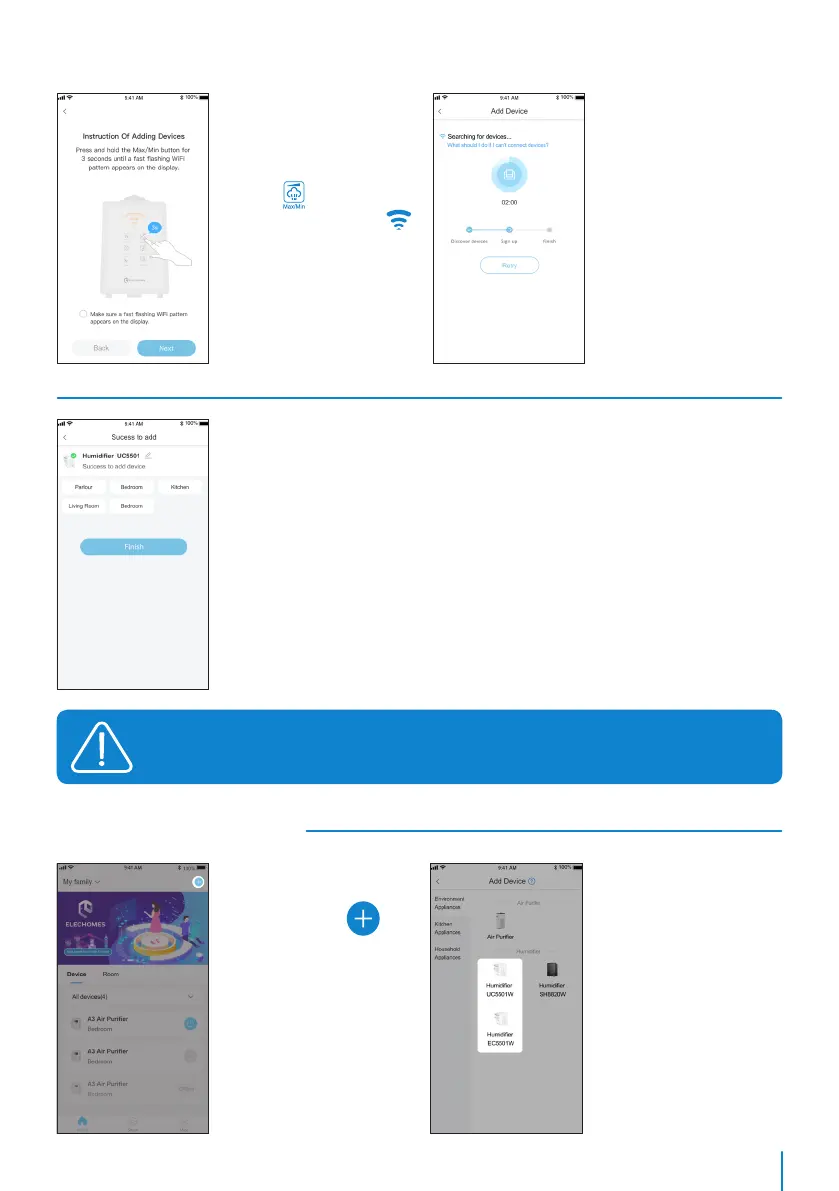
Step 1 Step 2
Step 6
Step 7
Step 5
Click the icon on
the top right corner on
the home page.
Click Humidifier on the
device list.
It will automatically
search for devices on
this page. You can check
the WiFi name and
password through the
pop-up window. If either
is wrong, click [Retry]
enter the Configure
Wi-Fi to modify WiFi or
password.
If this page appears,
your humidifer has been
successfully added. You
can modify the device
name or set the room it
locates. Click [Finish].
Press and hold the
devices Max / Min
button for 3s to make
sure its WiFi indicator
blinks quickly. Click
[Next].
If the Bluetooth mode connection fails, please refer to the AP mode connection guide
on the back to connect.

Related product manuals